

parwalrahul
Navigator
March 6, 2025
Quiz

Week 1 Exercise - Exploring Gen AI for Testers

  • March 6, 2025
  • 56 replies
  • 1934 views

Introduction

Welcome to your first activity on generative AI for testers! In this activity, you’ll explore different AI tools that can support your testing and engineering tasks. 

By browsing through a curated collection of AI solutions, you’ll gain insights into how these tools can be integrated into your day-to-day work.

Benefits of Participating in This Activity

  • Discover New Tools: You’ll explore a variety of AI solutions that can be used in your day-to-day work, activities, and tasks.
  • Gain Hands-On Experience: By experimenting with different tools, you’ll learn how to integrate Gen AI into your everyday testing tasks.
  • Share and Learn: When you share your findings, you’ll also benefit from the unique discoveries and use cases presented by your peers.
  • Immediate Application: You’ll come away with actionable insights and practical strategies to enhance your work right away.

Activity Description:

  1. Visit the Future Tools website:
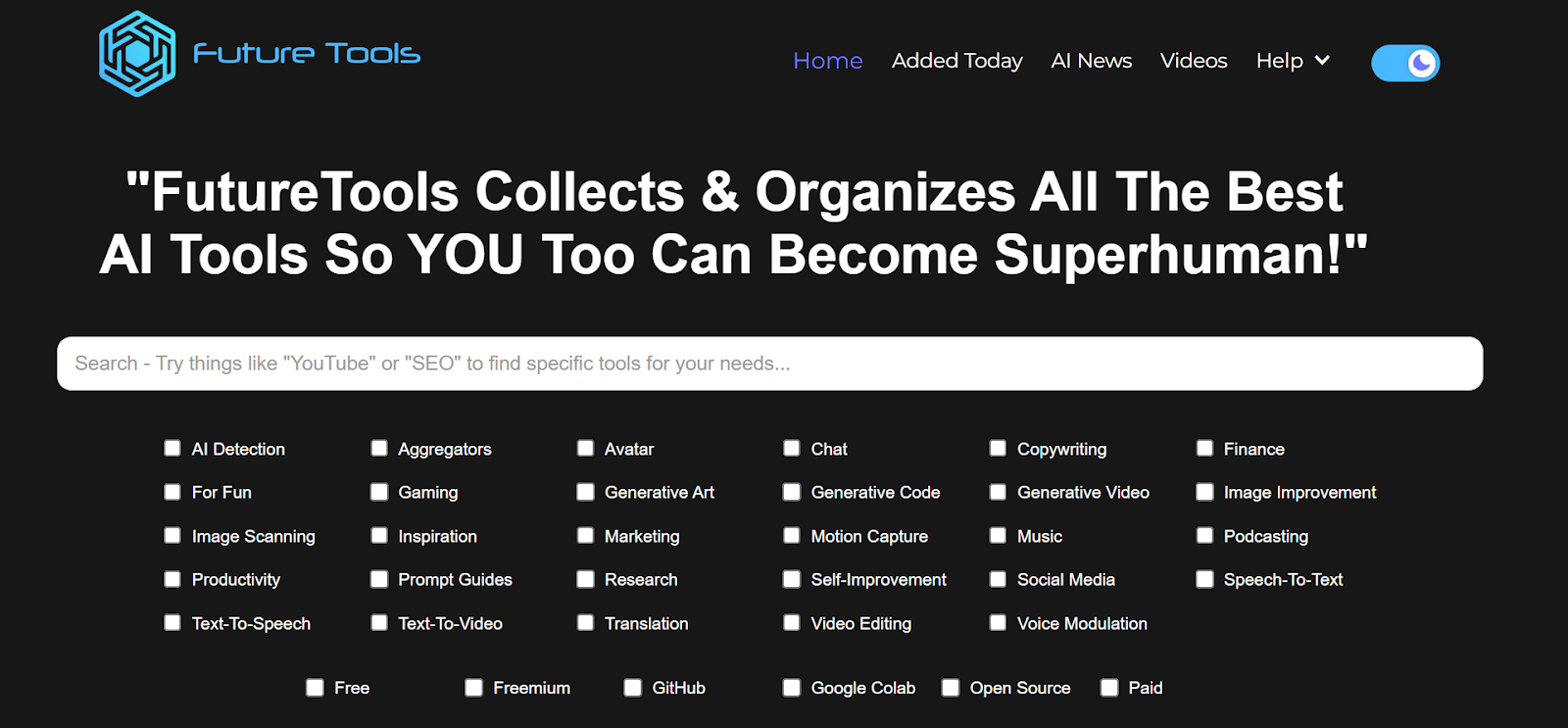
    Go to https://www.futuretools.io/ and explore the catalog of AI tools.
AD_4nXeMMyk0RzIiD-CJfrOXoJlebC3NMtr2AQWGwN53SN4aTnFkMda7ZteLf0uX0WSAffyo54frmhDytUQ8GxVJ3SiTXKpfE-z3p6cDooDODKIt7VMsBzs2zdFZlMDbghvSRDoSrFR6?key=-UrBosk91MUix1zjtlFYz6yt

  1. Filter for specific criteria:
    Use the filters to narrow down tools that fit your interest or testing needs:
    • Tool categories (e.g., “AI Detection,” “Productivity,” “Generative Code”, etc.)
    • Usage preference (e.g., “Free,” “Freemium,” “GitHub”, etc.).
  2. Select a Minimum of Three Tools:
    • Choose any three tools that stand out to you based on your role as a tester or engineer.
    • Make sure to select unique tools you find potentially valuable for testing or day-to-day work tasks.
  3. Evaluate and Document:
    For each chosen tool, briefly document:
    • Name of the tool
    • Key features or capabilities that might benefit testing or engineering
    • Example use case of how you would apply this tool in your daily work (e.g., test data generation, automated test code generation, learning, etc.)
  4. Share Your Findings:
    • In response to this post, post your list of three tools along with short explanations of how each can be used.
    • Take a moment to read or listen to other participants’ selections and see if any tools could also benefit your workflow.

56 replies

parwalrahul
Navigator
March 14, 2025

@Charmi07 : nice tools explored. especially the #1 and #3.


For #3, i.e. postfluencer, I will try it out. looks like something promising.

https://testingtitbits.com/
Space Cadet
March 15, 2025

@parwalrahul ​@Kateryna  I missed the first 2 sessions of “Gen AI for testers”. Are the recordings available here or on your youtube?

parwalrahul
Navigator
March 16, 2025

@Ravip16 not yet.


Maybe check once with ​@Mustafa 

https://testingtitbits.com/
Ensign
March 19, 2025

1. Chatbot Arena (formerly LMSYS): Free AI Chat to Compare & Test Best AI Chatbots

Compared two models, gemini-2.0-pro-exp-02-05 & llama-3.1-8b-instruct

Prompt used: "Generate comprehensive test cases for a shopping cart feature, considering all possible user interactions and edge cases."

gemini-2.0-pro-exp-02-05: 

1. Generated 19 test cases and Categorized them based on Functionality Covering positive, negative and edge cases.
2. Test cases are detailed but Pre Conditions were missing,

llama-3.1-8b-instruct: 

1. Generated 12 test cases.
2. Test cases are generic and have Preconditions.
3. Generated a  test case related to security 

2. https://www.text2sql.ai/

Convert Text to SQL with AI, in seconds

It generates instant queries with the proper input

3. RCP (Right-Click Prompt): AI Prompt Manager

1. It allows you to save prompts in folders through a Chrome browser extension
2. You can access these saved prompts by right-clicking
3. Prompts can be copied to your clipboard for use

parwalrahul
Navigator
March 19, 2025

@satishracherla you have found some of the best tools among all the responses till date.


I like how you found stuff with purpose and to help you with essential tasks.


Wasn’t aware about RCP, thanks for mentioning it and educating us all.

https://testingtitbits.com/
Kusumketu
Ensign
March 19, 2025

Hi ​@parwalrahul ​@Mustafa ​All


I explored the following AI tools across different categories:

1. Salesforce Testing

Tool: TestZeus

TestZeus is an open-source UI automation framework designed specifically for Salesforce applications. It aims to simplify and enhance the test automation process.

Key Features:

  • Autolocators: Uses Salesforce's UI API to generate dynamic locators for UI elements, minimizing manual locator definitions and enhancing test stability.

  • Natural Language Testing: Enables test creation in plain English using Gherkin syntax, making it accessible to non-developers.

  • Zero Maintenance: AI agents adapt to Salesforce updates, reducing manual test maintenance.

  • Comprehensive Testing Capabilities: Supports UI, API, accessibility, security, visual validations, and mobile testing.

2. Requirement and Test Case Management

Tool: MindyGem

MindyGem is an AI-powered requirements management platform that streamlines the creation and management of technical documentation, improving product development efficiency.

Key Features:

  • AI-Generated Technical Requirements: Automatically generates detailed specifications from UI designs, reducing manual effort.

  • User Story and Acceptance Criteria Creation: Facilitates decomposition of requirements into features, user stories, and acceptance criteria.

  • Document Generation and Management: Enables users to create and manage documents like briefs, proposals, and technical specifications within a unified knowledge base.

  • Collaboration Tools: Offers commenting, status tracking, and labeling features for better team collaboration.

Use Cases:

  • Requirement Gathering: Quickly generate project briefs from initial ideas for estimations and detailed planning.

  • Requirement Development: Create epics, user stories, and acceptance criteria for structured development.

  • Project Management: Planned features include direct ticket creation and test case management to streamline workflows.

3. Self-Improvement

Tool: Screvi

Screvi is a platform designed to help users collect, organize, and revisit reading highlights and bookmarks, transforming them into a personalized knowledge base.

Key Features:

  • Unified Highlight Management: Consolidates highlights from Kindle, Twitter, physical books, and web articles into a searchable repository.

  • AI-Powered Semantic Search: Provides advanced search capabilities for finding information without exact keyword matches.

  • Familiar Interface: Displays highlights in a scrollable feed and Instagram-like stories for an engaging reading experience.

  • Cross-Platform Accessibility: Available on browser extensions and mobile applications for seamless access.

Use Cases:

  • Personal Knowledge Management: Build a centralized repository of insights from various reading materials for continuous learning.

  • Research and Academic Work: Efficiently organize and retrieve information for research purposes.

  • Content Creation: Writers can use semantic search to access relevant notes for articles, scripts, and presentations.

These AI tools offer valuable solutions for enhancing productivity, improving collaboration, and streamlining processes across different domains.


Kusum Ketu
parwalrahul
Navigator
March 20, 2025

@Kusumketu wow! you really tried three gem of a possibilities.


I personally would want to explore #Screvi as I am a reading buff and sometimes its hard for me to keep track of the things that I learned.


Really liked the exploration and good summarization with crisp formatting. Cheers!

https://testingtitbits.com/
Ensign
March 20, 2025

Introduction

Welcome to your first activity on generative AI for testers! In this activity, you’ll explore different AI tools that can support your testing and engineering tasks. 

By browsing through a curated collection of AI solutions, you’ll gain insights into how these tools can be integrated into your day-to-day work.

Benefits of Participating in This Activity

  • Discover New Tools: You’ll explore a variety of AI solutions that can be used in your day-to-day work, activities, and tasks.
  • Gain Hands-On Experience: By experimenting with different tools, you’ll learn how to integrate Gen AI into your everyday testing tasks.
  • Share and Learn: When you share your findings, you’ll also benefit from the unique discoveries and use cases presented by your peers.
  • Immediate Application: You’ll come away with actionable insights and practical strategies to enhance your work right away.

Activity Description:

  1. Visit the Future Tools website:
    Go to https://www.futuretools.io/ and explore the catalog of AI tools.

AD_4nXeMMyk0RzIiD-CJfrOXoJlebC3NMtr2AQWGwN53SN4aTnFkMda7ZteLf0uX0WSAffyo54frmhDytUQ8GxVJ3SiTXKpfE-z3p6cDooDODKIt7VMsBzs2zdFZlMDbghvSRDoSrFR6?key=-UrBosk91MUix1zjtlFYz6yt

  1. Filter for specific criteria:
    Use the filters to narrow down tools that fit your interest or testing needs:
    • Tool categories (e.g., “AI Detection,” “Productivity,” “Generative Code”, etc.)
    • Usage preference (e.g., “Free,” “Freemium,” “GitHub”, etc.).
  2. Select a Minimum of Three Tools:
    • Choose any three tools that stand out to you based on your role as a tester or engineer.
    • Make sure to select unique tools you find potentially valuable for testing or day-to-day work tasks.
  3. Evaluate and Document:
    For each chosen tool, briefly document:
    • Name of the tool
    • Key features or capabilities that might benefit testing or engineering
    • Example use case of how you would apply this tool in your daily work (e.g., test data generation, automated test code generation, learning, etc.)
  4. Share Your Findings:
    • In response to this post, post your list of three tools along with short explanations of how each can be used.
    • Take a moment to read or listen to other participants’ selections and see if any tools could also benefit your workflow.

Test Case Generation
One of the leading Generative AI tools for test case generation is KaneAI by LambdaTest. This tool utilizes natural language processing (NLP) to streamline the creation, automation, and management of test cases using conversational inputs.

Key Features & Capabilities
Effortless Test Creation – Enables testers to generate and refine test cases using natural language, simplifying the testing process.
Intelligent Test Planning – Automatically creates test steps aligned with high-level objectives, ensuring consistency with project goals.
Multi-Language Code Export – Converts test cases into various programming languages, supporting frameworks like Selenium and Playwright.
Bi-Directional Test Editing – Allows seamless modifications in both natural language and code, with automatic synchronization.
Smart "Show-Me" Mode – Translates user actions into natural language commands, making test creation more intuitive.
Example Use Case
Consider a company developing an e-commerce application that needs to validate the checkout process.
With KaneAI, a tester can describe the scenario in plain English:
"Verify that a user can add an item to the cart, proceed to checkout, enter payment details, and complete the purchase successfully."

KaneAI then generates an automated test script, exportable into multiple programming languages for integration with the company’s test automation framework—accelerating the process and minimizing manual errors.

Test Data Generation
For test data generation, a notable AI-powered tool is MOSTLY AI. It creates synthetic test data that mimics real production data while ensuring privacy by eliminating sensitive information.

Key Features & Capabilities
Synthetic Test Data Generation – Produces realistic test data that preserves statistical properties without using actual personal information.
Regulatory Compliance – Helps companies adhere to GDPR and other data privacy laws by using synthetic data instead of real user data.
Support for Complex Data Structures – Generates relational data structures with referential integrity, making it ideal for comprehensive testing.
Example Use Case
A financial institution needs to test a new application that processes customer transactions but cannot use real customer data due to privacy regulations.

By leveraging MOSTLY AI, the institution generates synthetic data that accurately simulates real-world transaction behaviors. This enables thorough application testing while ensuring compliance with data protection laws.

Why Choose MOSTLY AI?
It enhances testing quality while safeguarding user privacy, making it an essential tool for enterprises handling sensitive data.

Test Documentation Generation
For test documentation generation, a powerful AI tool is aqua cloud, designed to optimize software testing through automation and AI-driven insights.

Key Features & Capabilities
AI-Powered Requirement Generation – Automatically generates comprehensive requirement sets using natural language, significantly reducing manual effort.
Rapid Test Case Creation – Converts requirements into test cases within seconds, cutting down test creation time by up to 97%.
AI-Driven Test Data Generation – Produces relevant test data quickly, ensuring thorough test coverage.
Example Use Case
A company launching a new e-commerce platform needs to ensure its software is reliable and bug-free.

With aqua cloud, the testing team can define requirements using voice input, automatically generate test cases, and produce test data within seconds. This automation streamlines testing, optimizes resources, and ensures high software quality.

parwalrahul
Navigator
March 21, 2025

@Saravanan s thanks for the overview on Kane AI.

I was looking to read more about it from a user’s point of view. Thanks!

https://testingtitbits.com/
Ensign
March 25, 2025

free+Inspiration


  • Name of the tool: Universal Data Generator
  • Key features or capabilities  to generate test data
  • Example use case test data generation

free+Inspiration+prompt guides


  • Name of the tool Snack Prompt
  • Key features or capabilities useful prompts like prompts for automated workflows and swot analysis
  • Example use case I’d find for example useful automations for various tasks


  • Name of the tool Fusion
  • Key features or capabilities A tool to write detailed prompts from basic prompts.
  • Example use case I’d find this useful in every aspect if I don’t have good prompts for specific tasks that I haven’t done that much.