

parwalrahul
Navigator
March 6, 2025
Quiz

Week 1 Exercise - Exploring Gen AI for Testers

  • March 6, 2025
  • 56 replies
  • 1934 views

Introduction

Welcome to your first activity on generative AI for testers! In this activity, you’ll explore different AI tools that can support your testing and engineering tasks. 

By browsing through a curated collection of AI solutions, you’ll gain insights into how these tools can be integrated into your day-to-day work.

Benefits of Participating in This Activity

  • Discover New Tools: You’ll explore a variety of AI solutions that can be used in your day-to-day work, activities, and tasks.
  • Gain Hands-On Experience: By experimenting with different tools, you’ll learn how to integrate Gen AI into your everyday testing tasks.
  • Share and Learn: When you share your findings, you’ll also benefit from the unique discoveries and use cases presented by your peers.
  • Immediate Application: You’ll come away with actionable insights and practical strategies to enhance your work right away.

Activity Description:

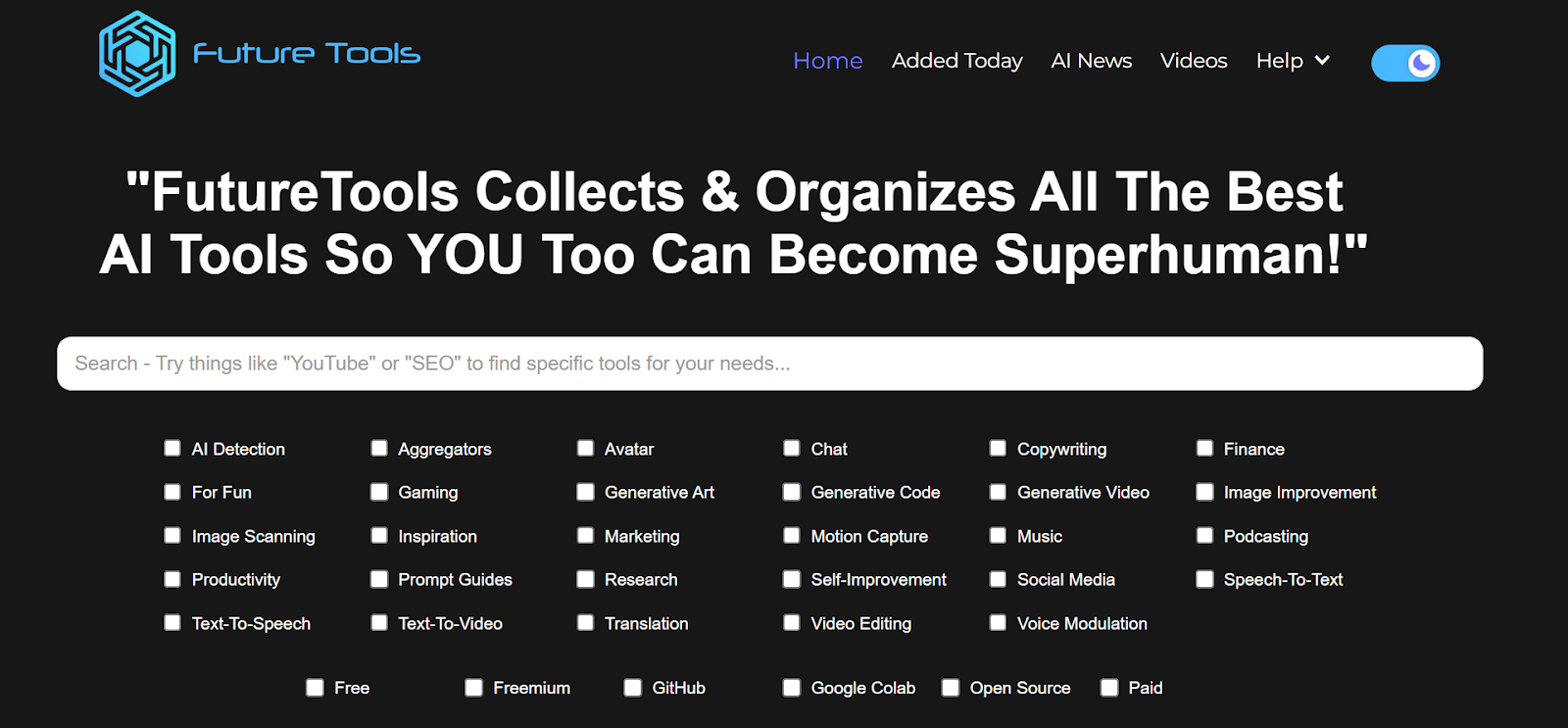
  1. Visit the Future Tools website:
    Go to https://www.futuretools.io/ and explore the catalog of AI tools.
AD_4nXeMMyk0RzIiD-CJfrOXoJlebC3NMtr2AQWGwN53SN4aTnFkMda7ZteLf0uX0WSAffyo54frmhDytUQ8GxVJ3SiTXKpfE-z3p6cDooDODKIt7VMsBzs2zdFZlMDbghvSRDoSrFR6?key=-UrBosk91MUix1zjtlFYz6yt

  1. Filter for specific criteria:
    Use the filters to narrow down tools that fit your interest or testing needs:
    • Tool categories (e.g., “AI Detection,” “Productivity,” “Generative Code”, etc.)
    • Usage preference (e.g., “Free,” “Freemium,” “GitHub”, etc.).
  2. Select a Minimum of Three Tools:
    • Choose any three tools that stand out to you based on your role as a tester or engineer.
    • Make sure to select unique tools you find potentially valuable for testing or day-to-day work tasks.
  3. Evaluate and Document:
    For each chosen tool, briefly document:
    • Name of the tool
    • Key features or capabilities that might benefit testing or engineering
    • Example use case of how you would apply this tool in your daily work (e.g., test data generation, automated test code generation, learning, etc.)
  4. Share Your Findings:
    • In response to this post, post your list of three tools along with short explanations of how each can be used.
    • Take a moment to read or listen to other participants’ selections and see if any tools could also benefit your workflow.

56 replies

parwalrahul
Navigator
March 25, 2025

@Hvena super collection.

loved the Snack Prompts website. It’s damn powerful.

Also, I wasn’t able to use the fusion tool. Are you able to use it? 

For me it gives, domain is not available if I try to interact with the page. pls check and let me know.

https://testingtitbits.com/
Ensign
March 27, 2025

Hello Rahul @parwalrahul  , Please find details of following tools that I found interesting

Name of the tool:  PotPie AI

Key features or capabilities 

Feature: PotPie AI allows users to visually select the data they want to scrape from websites without writing complex code.

Capability: Using a simple, point-and-click interface, we can map data points (like product details, prices, and reviews) directly from the webpage, making it accessible for non-technical users.

Example use case 

To test the responsiveness of your web application across different devices and screen sizes, ensuring that the data is displayed correctly in various resolutions. Use visual scraping and comparison to check that data is presented consistently across desktop and mobile views.


Name of the tool:  Safurai

Key features or capabilities 

Safurai can generate code snippets for classes, functions, and loops, saving  time on repetitive coding tasks.

Example use case 

Safurai can automate test case generation based on existing code. By analyzing the code, it can suggest unit tests and integration tests that can be used to ensure the functionality works as expected.


Name of the tool:  Visily

Key features or capabilities 

Improving the design and collaboration process for both designers and testers.

Example use case 

Testers can swiftly transform ideas into interactive prototypes, facilitating early visualization of test scenarios and user interactions. This accelerates the understanding of application flows and aids in identifying potential test cases.

parwalrahul
Navigator
March 27, 2025

@sarika77 nice collections.


I liked the Visily tool the most from your collection. It’s a niche area where AI can really assist folks to get creative.

https://testingtitbits.com/
Space Cadet
March 30, 2025

As part of my QA exercise, I explored the Future Tools website and selected three tools that could be useful for testing and engineering tasks. Here are my findings:

  1. Qodex.ai – This tool helps automate software testing by generating test cases, test data, and test scripts. It also detects bugs automatically.
    Use case: I can use Qodex.ai to reduce manual effort in writing test cases and improve test coverage.

  2. CodeBeaver – An AI-powered tool that generates and updates unit tests, runs test suites, and finds bugs in code.
    Use case: I can use CodeBeaver to automate unit testing, making it easier to find and fix issues early in development.

  3. Cline AI – A tool for A/B testing and split testing, mainly for websites and UI changes. It uses AI to create test variations quickly.
    Use case: I can use Cline AI to test different versions of a webpage or feature and see which one works better for users.

parwalrahul
Navigator
March 31, 2025

nice one, ​@japankansara 


Also check out some specific ai in testing tools listed here: AI in Testing – Resource Repository - Rahul's Testing Titbits


All the best!

https://testingtitbits.com/
Ensign
March 31, 2025

I explored different future tools and selected three tools for testing and engineering tasks. The selected tools are listed below.

1.Qodex.ai
    Key Features: Powerful AI-driven tool that automates API testing and documentation. 
    Use Case: Qodex.ai helps automate API testing by allowing users to write test cases in plain English. It then generates and runs tests automatically, reducing manual effort. The tool also ensures up-to-date API documentation and integrates with CI/CD pipelines for seamless workflow automation.

2. LambdaTest
    Key Features: LambdaTest is a cloud-based testing platform that enables cross-browser, mobile app, and automation testing on thousands of real devices and browsers.
    Use Case: LambdaTest helps developers and testers ensure their web applications work seamlessly across different browsers, devices, and operating systems. By leveraging its powerful testing features, teams can improve the quality, performance, and reliability of their applications.

3. Bagasura:
    Key Features: ​Bugasura is an AI-powered bug tracking tool designed to streamline the process of reporting, managing, and resolving software issues for modern technology teams. It offers a user-friendly interface and integrates seamlessly with popular project management tools, enhancing productivity and reducing technical debt.
    Use Case: Bugasura helps track and resolve bugs efficiently, ensuring stable and reliable software releases. It provides a structured approach to defect reporting and management, streamlining the testing and resolution process. Bugasura integrates with project management tools to enhance visibility into the development process, improving planning and resource allocation. Developers, testers, and other stakeholders can collaborate effectively, ensuring alignment and transparency on issue tracking and resolution.
 

parwalrahul
Navigator
March 31, 2025

@Hima Shah nice list.


I have tried bugasura too and it’s a fab product! Built for testers and by testers.

https://testingtitbits.com/
Ensign
April 1, 2025

I explored the Future Tools website and found three AI tools that can be really helpful for QA testing. These tools can make testing easier by saving time, reducing errors, and improving test quality.

The first tool is Testim. It helps in automating test cases, meaning it can run tests on its own without much manual work. It also learns from previous tests and adjusts if there are small changes in the website. I would use Testim to test the OpenCart website automatically so I don’t have to repeat the same tests manually every time.

The second tool is ChatGPT Code Interpreter. This tool can help in writing test scripts, finding errors in test logs, and creating test data. I would use it to generate Python scripts for automation, check errors in test reports, and create sample data for testing.

The third tool is Synthetic Data Generator. It creates fake but realistic data, which is useful for testing without using real customer information. I would use this tool to create test data for different scenarios in Projects, such as testing with different types of users or large amounts of data.

These AI tools can make testing faster and more efficient. They help reduce manual work, improve accuracy, and make sure the application works correctly in different situations.

parwalrahul
Navigator
April 1, 2025

@Yashvi_Mehta didn’t know about synthetic data generator. will check that out.

https://testingtitbits.com/
Mustafa
Technical Community Manager
April 3, 2025

Important Note:


Hi, Everyone.

To anyone who attended the course, you have 15 days to submit your answers to all 4 of ​@parwalrahul's exercises before we close submissions on Friday the 18th of April. Certificates will start to be rolled out today, so keep any eye on your emails.

Thank you.

Only in Death does Duty End