


SeaLights Now Supports SAP ABAP: Quality Intelligence for your SAP applications in the cloud
Hey ShiftSync community,
Big news for those working in SAP environments: SeaLights now supports SAP ABAP! That means you can finally bring Change Impact Analysis and Quality Intelligence to your SAP applications in the cloud, without the guesswork.
What’s New?
With ABAP support, SeaLights helps you understand exactly what changed—whether it’s code, configurations, or table updates—and which tests cover those changes. This gives you:
- 🔍 Real-time visibility into ABAP code and non-code changes
- 🧪 Smarter test selection—run only what’s relevant
- 🚫 Fewer redundant test runs
- 🕵️♂️ Detection of untested changes to close coverage gaps
- 📦 Tracking across transports and transactions
- ✅ Quality gates based on live test data
Wait, Non-Code Changes Too?
Yep. While SeaLights doesn’t measure test coverage for non-code changes directly (like config tweaks or table updates), it doesn’t ignore them. Instead, it maps those changes to the code they affect. If that code has tests, SeaLights flags them as impacted—just like it would for a regular code change. Smart, right?
How It Works
SeaLights uses two core components:
- Build Agent: Detects changes in ABAP code and SAP configurations
- Test Listener: Captures all test executions—manual, regression, end-to-end
Together, they feed unified dashboards that show change impact, coverage, and release readiness across your SAP landscape. All this integrates with SeaLights’ test optimization and quality gate features.
Continuous, Cloud-Based, and Context-Aware
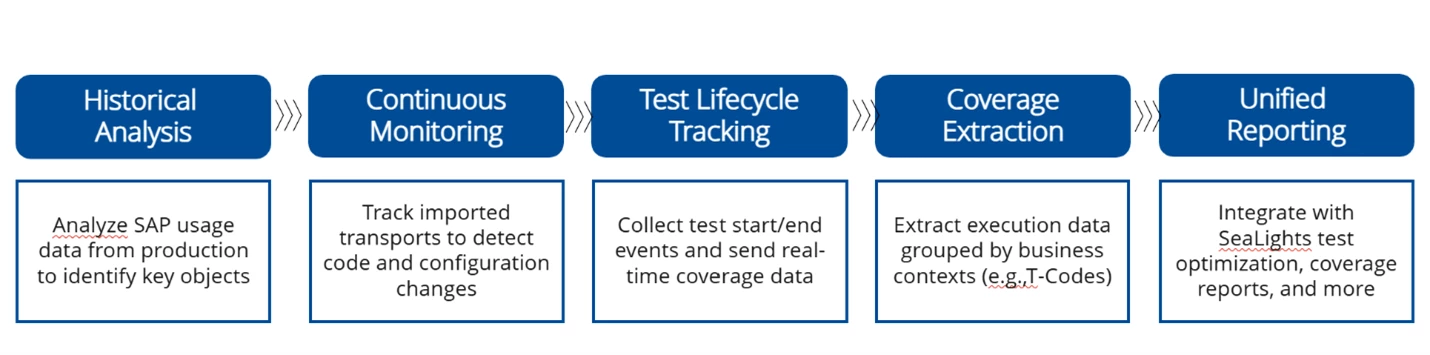
SeaLights runs as a continuous cloud process. It starts by analyzing SAP production usage to identify key ABAP objects, then monitors transports for changes. As tests run, it captures real-time coverage data and organizes it by business context (like T-Codes).
Compatible with Your SAP Tools
SeaLights ABAP Agent plays nicely with:
- SAP Cloud ALM
- SAP Solution Manager
- Tricentis Test Automation suite
Is It Secure?
Absolutely. SeaLights does not access your SAP code repositories. It pulls metadata from SAP tables—no actual code leaves your environment. You get full analysis and coverage tracking, while keeping sensitive data safe.
Where Can It Run?
Anywhere. The ABAP Agent can be installed on any Windows machine—on-prem, private cloud, or public cloud—as long as it can connect to your SAP system and the SeaLights backend. Flexibility is built in.
Why This Matters
This update is all about giving SAP teams the same level of insight and control that other Applications already enjoy.
With LiveCompare and now SeaLights for ABAP release, Tricentis is taking another step toward unified, AI-augmented quality intelligence; whether you’re on-prem or in the cloud.
If you’re working with SAP and want to level up your testing strategy, this is a game-changer.
Got questions or want to share how you’re using SeaLights in your SAP workflows? Drop them in the comments.
- Check out the docs to see how it works: https://docs.sealights.io/knowledgebase/setup-and-configuration/sealights-agents/abap-agent
- Join the upcoming webinar to see it in action: https://www.tricentis.com/events/sealights-for-abap-webinar

