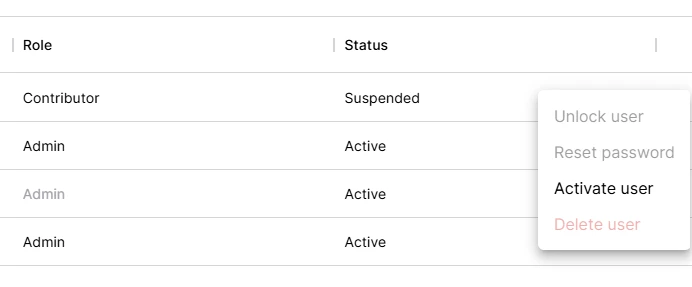
Could this be a bug? Could you please provide your advice on this?
Thank you in advance.
Best regards,
Hey there! @MarleneG
Ah, I see you're having trouble with user management in Tricentis Test Automation for SAP. I've actually run into something similar before! 🤔
From what I understand, you:
Have admin access
Can't access user management features (add users, reset passwords, etc.)
Are following the official docs path (User menu > Settings > Users)
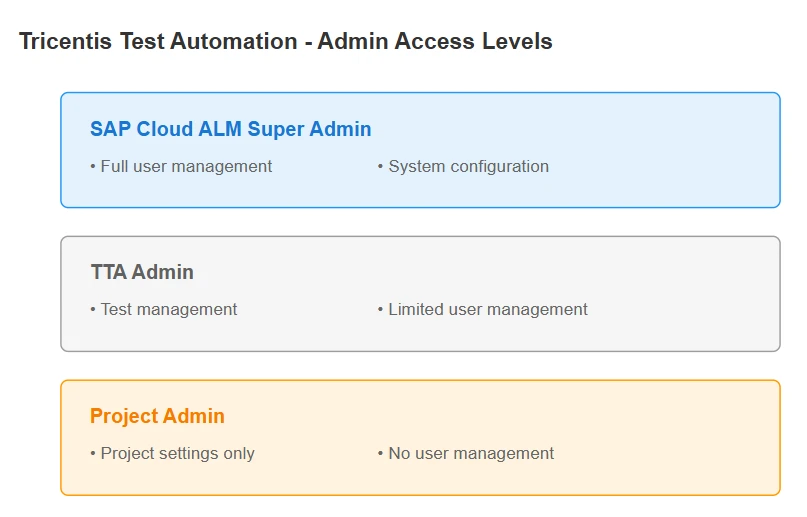
Here's what's probably going on - there are actually different "flavors" of admin roles in TTA for SAP when it's integrated with SAP Cloud ALM. Let me create a quick visual to show you the admin hierarchy:
TTA Admin Roles Hierarchy
From your description, it sounds like you might have TTA Admin or Project Admin rights, but not the full SAP Cloud ALM Super Admin privileges needed for user management. This is actually pretty common when TTA is integrated with Cloud ALM, since user management typically gets handled at the Cloud ALM level.
Here's what I'd suggest:
First, check which admin role you actually have (you can see this in your profile settings)
If you're not a Super Admin, you'll need to:
Contact your SAP Cloud ALM administrator to get elevated privileges
Or have them handle the user management tasks directly
It's not a bug - it's just that the documentation you're looking at might be for standalone TTA rather than the Cloud ALM integrated version, where the permissions work a bit differently.
Let me know if you need help figuring out who your Cloud ALM admin is - I can point you to where to find that info! 😊
Hope this helps! Drop a reply if you need any clarification or run into other issues.
Hunt the bugs, ensure the hugs. Quality is everything.
Everything You Need to Know About Applying for a Swift Funds Loan
When financial needs arise, finding a reliable and hassle-free loan provider can make all the difference. Whether it’s for unexpected expenses, business expansion, or personal goals, Swift Funds Loanoffers a quick and efficient way to secure the funding you need. Known for their straightforward process and customer-centric approach, Swift Funds provides flexible loan solutions to suit diverse financial needs.