

Digital Validation for QA: Exploring the Latest Enhancements in Tricentis Vera
Introduction
Quality assurance (QA) in regulated industries like healthcare and life sciences faces unique challenges. Traditional Computer System Validation (CSV) methods tend to be document-heavy and slow, often clashing with modern agile and DevOps practices. Teams are now shifting toward Computer Software Assurance (CSA) – a risk-based approach encouraged by the FDA – to streamline validation without compromising compliance. In this context, Tricentis Vera has emerged as a solution to digitize and automate the validation process, enabling QA engineers to deliver high-quality software faster while meeting strict regulatory requirements. This article breaks down the pain points of legacy validation, how Tricentis Vera addresses them, and the latest Vera updates that further empower QA teams.
Challenges in Regulated QA and Validation Processes
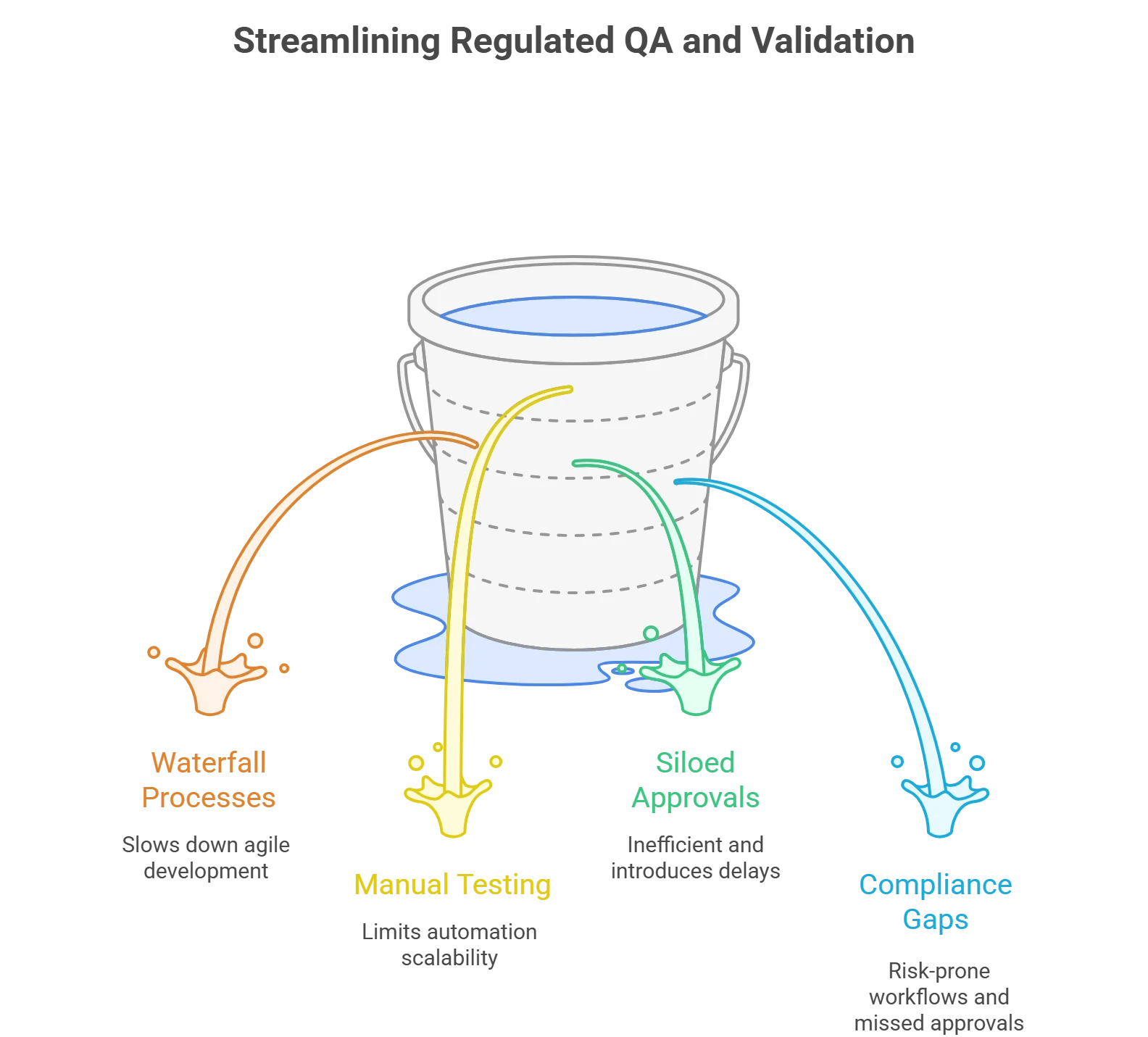
QA teams in regulated sectors have long been constrained by legacy validation processes. Some key pain points include:
-
Waterfall-era processes: Many validation practices are rooted in waterfall methodologies, making it difficult to align compliance activities with agile development speeds. Teams want their compliance requirements to keep pace with iterative development rather than slow it down.
-
Manual testing and documentation: Heavy reliance on manual testing in regulated environments limits the ability to scale automation. Test evidence is often captured in static documents (e.g. PDFs or printed reports) that require wet ink signatures, creating a labor-intensive paperwork trail.
-
Siloed, paper-based approvals: Validation still frequently involves printed documents passed around for approvals and signatures. This static documentation approach is inefficient and introduces delays, becoming an extraneous drag on the software quality process.
-
Risk of compliance gaps: These legacy CSV practices lead to inefficient and risk-prone workflows. With disconnected tools and manual hand-offs, there’s greater chance of missing approvals or failing to catch defects early, which can jeopardize compliance.
Collectively, these factors make traditional validation time-consuming and error-prone. Teams end up focusing more on paperwork than actual quality improvement. It’s clear why QA engineers and validation leads are seeking ways to mitigate risk earlier, more consistently, and at scale. They need a way to accelerate testing and approvals without sacrificing regulatory compliance.
What is Tricentis Vera and How Does It Help?
Tricentis Vera is a digital validation platform purpose-built to address these challenges. In essence, Vera provides a unified system for managing compliance activities (approvals, signatures, audit trails) within the software testing lifecycle. It automates the validation process by embedding approval workflows and electronic signatures directly into your testing tools. This means QA teams can perform required compliance steps without breaking their normal development/test flow.
Vera accelerates critical approval, verification, and compliance management processes in the testing journey. It enforces technical controls (like permission checks and traceability) and supports 21 CFR Part 11-compliant electronic signatures, so digital sign-offs are legally equivalent to handwritten ones. By replacing manual signatures and Word/PDF documentation with an automated system, Vera makes validation workflows standardized and repeatable – no more ad-hoc chasing of signatures or duplicating work across systems. Teams can demonstrate high levels of control over their processes and centralize compliance across tools, which is crucial for passing audits.
Perhaps most importantly for QA engineers, Vera integrates with the tools you already use. It provides one common user interface acting as an approval queue for artifacts from multiple ALM and testing tools. For example, Vera can tie into Tricentis qTest, Jira, or Tosca, aggregating all pending test case approvals or requirement sign-offs in one place. This unified UI reduces the learning curve (no need to log into several systems to approve tests) and breaks down silos between testing and compliance teams.
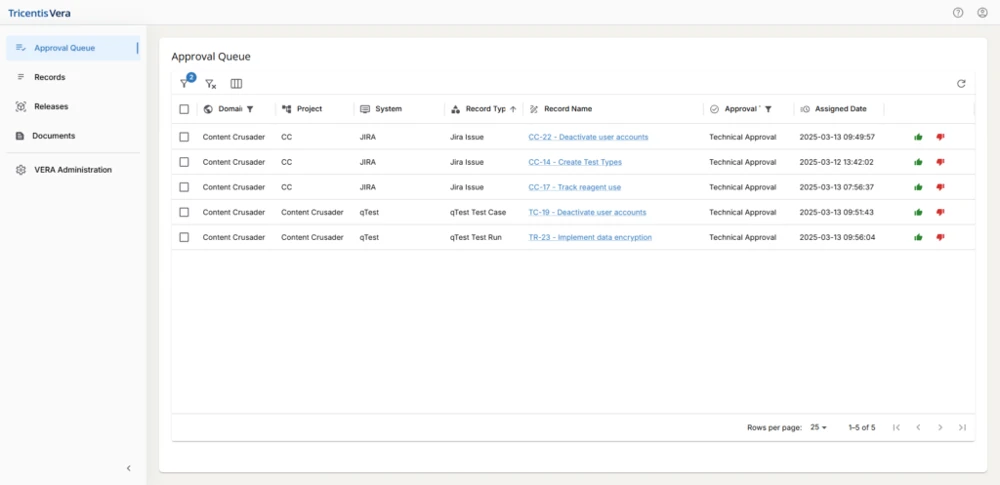
Additionally, Vera sends automated email notifications for pending approvals or any rejected records. This proactive alerting ensures everyone knows when their input is needed or if a test artifact was not approved, preventing bottlenecks. All approval actions are captured in an audit trail for traceability. In short, Vera acts as a central nervous system for QA compliance: connecting disparate tools, enforcing governance, and keeping a tamper-proof record of who approved what and when. This lets QA teams focus on testing and risk mitigation rather than paperwork, while compliance managers gain visibility and confidence that processes are being followed.
Latest Features and Updates in Tricentis Vera
Tricentis has been continually enhancing Vera to better support QA teams’ needs. The latest updates (as highlighted in a recent expert session) introduce new capabilities that streamline validation even further. Below we explore the most recent features and how they benefit QA and validation stakeholders:
Reassigning Approval Tasks for Flexibility and Accountability
One of the newest features in Vera is the ability to reassign approval tasks after an item has been routed for approval. In prior versions, once a test case or requirement was sent for approval, the designated approval groups were fixed – any member of that group could approve, but you couldn't specify exactly who should do it. Now, a domain administrator or the “route owner” (the person who initiated the approval) can delegate a pending approval to a specific individual user within the relevant role group.
In practice, this means if a particular approver is unavailable (on vacation, for example) or if responsibility needs to shift, the route owner can reassign that task to an alternate qualified approver in the same role. Once reassigned, only that chosen user can complete the approval, whereas if no reassignment is done, any user in the role’s pool can still approve as before. This provides greater clarity and accountability – it’s always clear who exactly approved a given step – and helps avoid delays. A task won’t sit untouched just because the original approver is out; it can be promptly given to someone else with the appropriate authority.
This enhancement is part of a broader effort to support “named approvers” (explicitly assigned approvers) in Vera. The reassign-after-routing capability is the first step of a crawl-walk-run rollout. In an upcoming release, Tricentis plans to let teams assign approvers upfront before routing an item for approval. In the future state, a QA lead could specify exactly who the technical reviewer, business reviewer, and QA approver will be for a test record at the time of routing. Those named individuals would be the only ones notified and authorized to sign off, and even they could delegate their task further if needed. Taken together, these improvements give organizations much finer control over the approval process. QA managers can ensure the right subject matter experts are signing off on tests or requirements, and they can easily transfer approval duties when team changes occur – all within the tool. (It’s worth noting that bulk operations like bulk assignment or bulk routing of multiple records are also being considered to save time, as many customers have requested the ability to route items in bulk.)
Extending Approvals to Requirements and Defects (Workflow for All Artifacts)
Another major development is that Tricentis Vera is expanding its coverage beyond just test cases. Approvals for requirements and defects in Tricentis qTest are now supported in the latest Vera updates (released as a technical preview). Historically, Vera’s integration with qTest was limited to test case and test run artifacts. If teams wanted to formally approve a requirement change or a defect resolution, they had to rely on external processes. The new enhancement brings requirements and defect management into Vera’s digital validation fold.
What does this mean for QA teams? Essentially, you can define configurable workflows in Vera for the lifecycle of requirements and defects, including approval steps. For example, when a requirement is created or modified, Vera can enforce an approval step before that requirement is marked as finalized or baselined. Similarly, a defect ticket could require a formal QA approval before it’s closed, if that defect pertains to a GxP (regulated) system. In the past, marking a requirement obsolete or changing its status might have just been a toggle in qTest; now you can incorporate an approval workflow for such state changes. This ensures that no critical change goes unreviewed – every requirement and defect can carry the electronic signatures of reviewers just like test cases do.
As of the latest update, this capability for requirements and defects is in technical preview, with a plan for a full release by Q1 of next year. Early-adopter teams can start configuring requirement/defect workflows now and provide feedback. The goal is to have a robust, configurable approval workflow engine that covers all key record types in qTest. Over time, Tricentis also plans to loop back and give the same flexible workflow treatment to test cases and test runs – meaning teams could customize how tests move from creation to execution to approval with more nuance than the current out-of-the-box sequence.
From a QA perspective, this extension is huge. It breaks down another silo: test management, requirements management, and defect tracking are all unified under one compliant approval system. QA engineers, business analysts, and developers can continue using qTest or Jira to manage their requirements and defects, while Vera works behind the scenes to handle the approvals and sign-offs. This provides end-to-end traceability – for instance, you can trace a requirement from its creation, through development and testing, to the approval of its implementation and any linked defect fixes, all with auditable sign-offs. For regulated industries, that traceability is golden for audits and quality oversight.
Usability, Performance, and Integration Improvements
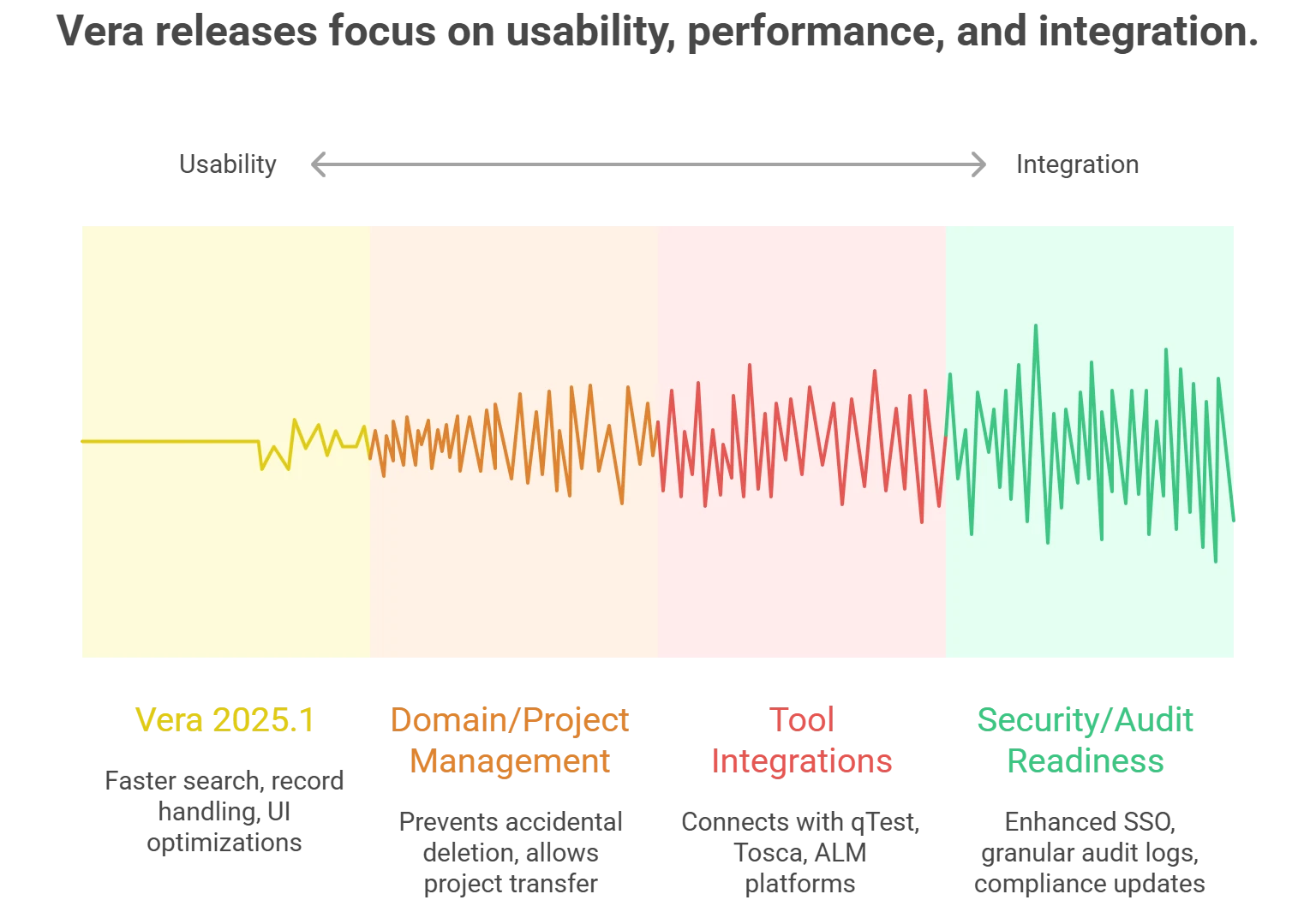
Beyond the headline features above, recent Vera releases include numerous usability and integration enhancements that benefit daily users:
-
Faster search and record handling: The Vera 2025.1 update improved the performance of the approval queue and record search functionality. Searches now load faster and filtering results (by domain, project, etc.) is snappier, which saves time when QA leads are looking up specific records or approval statuses. Reporting and record maintenance tasks were streamlined with UI optimizations and behind-the-scenes performance tweaks. For example, the record detail view was refined (adjusted layouts, font sizes, etc.) to make reviews easier on the eyes, and the print view for records was optimized to handle large documents without timing out. These changes ensure that as your repository of test evidence grows, Vera can scale with it and still feel responsive.
-
Improved domain and project management: Admins managing multiple projects in Vera have more control now. The system now prevents accidental deletion of domains or projects that still contain records, avoiding inadvertent loss of compliance data. New actions like “Move Project” allow administrators to transfer projects (and all their associated records) between domains if reorganization is needed. This is useful for companies that restructure teams or merge projects – they can keep all the historical validation records intact while reorganizing, instead of having to recreate or lose them. Such enhancements add safeguards and flexibility for larger organizations using Vera across many teams.
-
Stronger tool integrations: Vera continues to strengthen its integration with popular testing tools. As noted earlier, it works with Tricentis qTest and even supports Jira-based testing workflows. It also integrates with Tricentis Tosca (for automated test cases) and other ALM platforms, meaning teams can route automated test results for approval as needed. The vision is that whether you manage your tests in Jira, design them in Tosca, or track defects in qTest, Vera acts as the compliance layer across all. By having this single hub, teams avoid duplicating validation efforts in each tool and can **standardize CSV/CSA compliance across disparate systems】. This cross-tool integration is a big win for QA architects and managers who oversee heterogeneous toolchains – they get consistent approval processes and unified audit logs regardless of where the testing artifacts originate.
-
Security and audit readiness: Every release of Vera brings security patches and compliance updates as well. Recent versions have introduced features like enhanced single sign-on support and more granular audit logs (e.g. capturing admin role changes). These continue to bolster Vera’s position as a tool that not only speeds up validation but also tightens compliance controls. The comprehensive audit trail provided by Vera gives quality auditors and regulatory inspectors exactly what they need: a clear record that shows who performed each action, when, and why, across the entire testing lifecycle. Having this at the ready reduces the stress during audits, since evidence of compliance is automatically collected by the system rather than assembled manually at the last minute.
Conclusion and Next Steps
For QA engineers and validation teams, the push towards digital validation is transforming how they work. Tricentis Vera enables teams to move faster without sacrificing quality or compliance. By automating approvals, consolidating tools, and eliminating paper-based documentation, Vera frees QA professionals to focus on testing and risk mitigation. The latest features – from reassignable approvers to end-to-end requirement and defect workflows – further reduce the friction in meeting regulatory requirements. QA engineers benefit by no longer having to chase down signatures, allowing them to spend more time on actual test design and execution. At the same time, QA leads and compliance managers gain confidence that every change is reviewed and every test is approved in a controlled, auditable way. This dual benefit is crucial in regulated industries where speed and compliance must go hand-in-hand.
Looking ahead, Tricentis is continuously improving Vera based on industry trends (like CSA) and customer feedback. Features on the horizon, such as full named approver assignment and bulk approval operations, promise to streamline validation processes even more. By adopting tools like Vera, organizations can enhance their validation maturity – achieving higher quality and faster delivery while reducing the risk of non-compliance. In an era where software updates for medical devices, pharmaceuticals, and financial systems need to be both rapid and rigorously vetted, having a digital validation platform is becoming a best practice.
Ready to learn more?
For a deeper dive and live demonstration of these capabilities, check out the on-demand webinar Tricentis Expert Session: Exploring the latest updates in Tricentis Vera.
This expert session walks through the features discussed above and offers additional insights on how to get the most out of Tricentis Vera in your QA practice. Whether you’re a seasoned validation lead or a QA engineer new to regulated environments, these updates to Vera can significantly boost your team’s efficiency and confidence in delivering compliant software.

