
Submit Your Questions in Advance
To ensure your questions are addressed during the Q&A session, we encourage you to submit them in advance. This will help us structure the discussion and prioritize key topics. Submit Your Questions Here
AI Workspace is Tricentis's AI orchestration platform built for quality engineering teams. It brings together AI agents, multi-step workflow automation, and your existing QA tool chain: Jira, qTest, GitHub, and more into a single intelligent layer.
It's not just automation. It's a smarter way to build quality in, from day one.
Join us for a live Q&A session with Shyam Singh, Lead AI Engineer at Tricentis and an expert in AI testing, covering a live demo of the AI Workspace as well.
In this interactive session, Shyam will answer your pre-submitted and live questions about the challenges of testing generative AI, assessing AI risks, and implementing effective testing strategies as well as questions submitted during the event. Don’t miss this opportunity to gain expert insights and enhance your approach to testing AI-driven systems.
Register now and submit your questions in advance to make the most of this session!
About Shyam
Shyam Singh is the Lead AI Engineer at Tricentis. He works on the AI layer within Tricentis products, helping build intelligent agents and automation that make quality engineering smarter. He is a part of a small dedicated team doing interesting work at the intersection of AI and testing. He is always happy to share what they're learning and hear from community members about what they are building.
At Tricentis, Shyam focuses on two key areas at the intersection of AI and testing: exploring approaches to testing AI systems and developing methods that use AI to empower software testers to more efficiently and effectively test their products.
This event is free for community members. If you want to participate in the event or get the recording, you have to firstly register in the community (see instructions below) and then click on Attend to reserve your spot.
How to register for an event, if you are not a member:
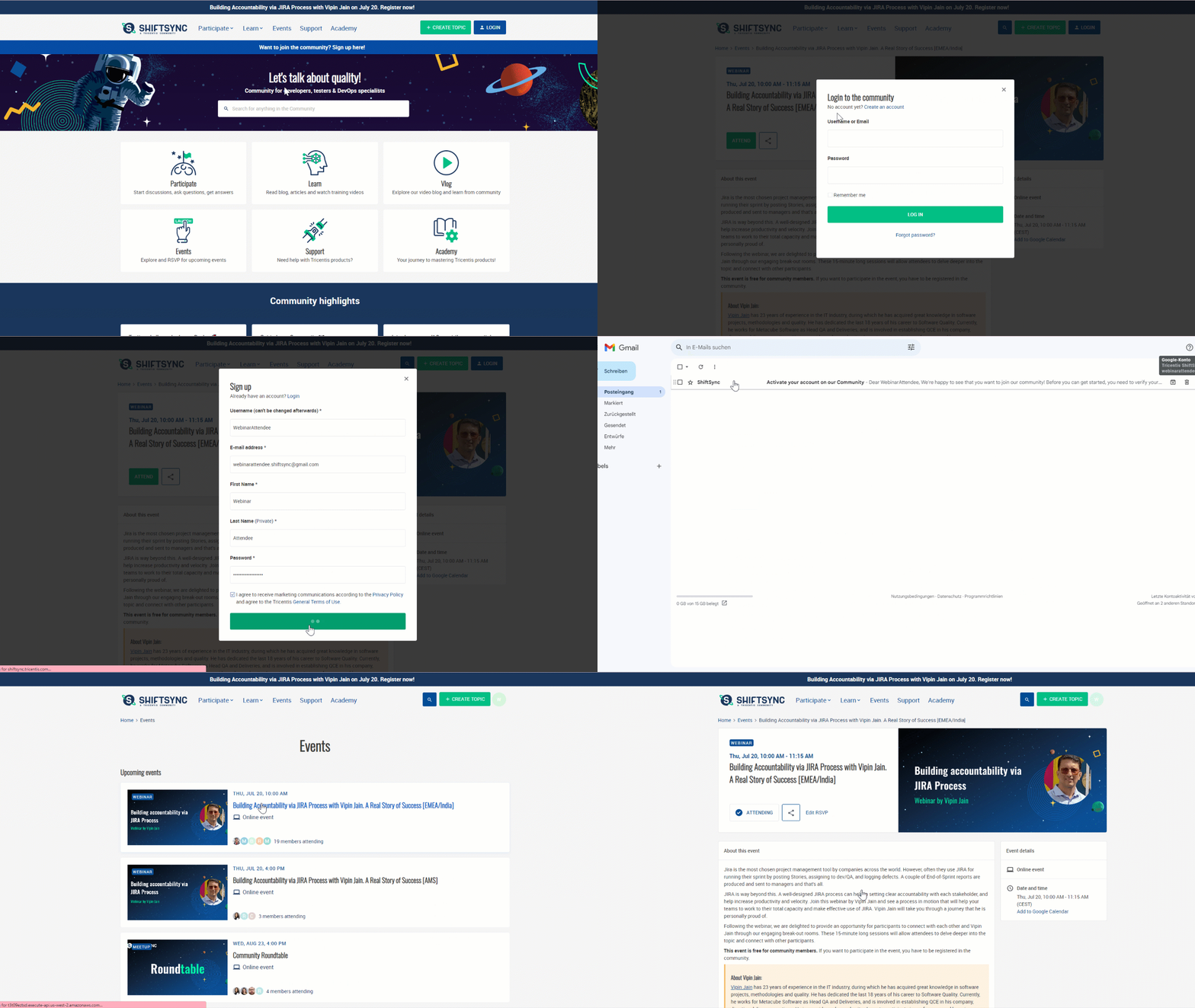
- Create an account.
Password advice: use the password generator for passwords or avoid dicitionary words ( even when using special characters).
- Check your email box, there is an email from ShiftSync. Click on a button in the email and activate your account.
- Go back to this page and click Attend.
- Now you are registered! ✨
Join 80,000+ testers learning AI-powered quality engineering


Login to the community
No account yet? Create an account
Enter your E-mail address. We'll send you an e-mail with instructions to reset your password.