

Tosca Cloud Deployment: Empowering QA with Scalable Test Automation
Modern QA teams are increasingly moving test automation into the cloud to keep pace with agile delivery. Cloud-based testing brings unlimited scalability, easier collaboration, and dramatically lower infrastructure overhead. Tricentis Tosca now supports a cloud deployment option alongside the traditional on-premises suite – all under a single subscription. This means you can run Tosca on-prem, in the cloud, or in a hybrid mix, with all the same powerful features. By shifting tests to the cloud, teams can eliminate the need to maintain local servers, while still leveraging the familiar model-based testing approach of Tosca.
Test automation in the cloud unlocks numerous advantages for QA. For example, automated tests can execute much faster and more consistently, since they run in a repeatable, scalable environment. Automation also enables broader coverage: you can run more test scenarios in parallel than possible on a single machine. And because the cloud can spin up as many resources as needed, testing can be fully integrated into CI/CD pipelines without worrying about hardware constraints. In short, cloud-based testing helps teams get results faster and with greater reliability.
Key Benefits of Tosca’s Cloud Deployment
Putting Tosca in the cloud brings specific benefits that QA teams will appreciate. These include immediate access to authoring tools via a browser, pay-as-you-go scalability, and built-in team collaboration features. In the new Tosca cloud deployment, testers can expect:
-
Rapid test creation and reuse: Tosca’s Cloud Commander offers a streamlined, web-based editor. Testers can quickly author and edit tests in the browser, using the same model-based approach as the desktop version. Tests and modules become reusable assets that any team member can leverage, shortening the path to value.
-
Lower infrastructure costs: Because Tosca Cloud is zero/low footprint, there’s no need to manage on-prem servers for execution. This “no touch” infrastructure slashes maintenance work and hardware expenses. Your team just writes tests and triggers runs – Tricentis handles the backend.
-
Enhanced collaboration: Cloud deployment means anyone, anywhere can access the test suite. Results, dashboards, and logs can be easily shared with stakeholders in real time. The cloud interface keeps QA and development in sync through one unified environment.
-
Elastic scalability: Tosca in the cloud can automatically allocate more agents or VMs to handle parallel test runs. For example, Tosca is introducing Cloud Agents (Elastic Execution Grid) that run tests entirely on Tricentis’ cloud infrastructure. These agents bring “zero-footprint” execution – you simply queue up tests, and the cloud farm executes them in parallel without any local machines needed.
-
Continuous innovation: Cloud deployments get instant access to the latest features. When Tricentis rolls out a new Tosca release or simulation feature, your cloud environment updates immediately – no manual upgrade process required. This ensures your team always has cutting-edge tools (e.g. enhanced test editors, API virtualization, upcoming TDM, etc.) at their fingertips.
Migrating Your Test Suite to Tosca Cloud
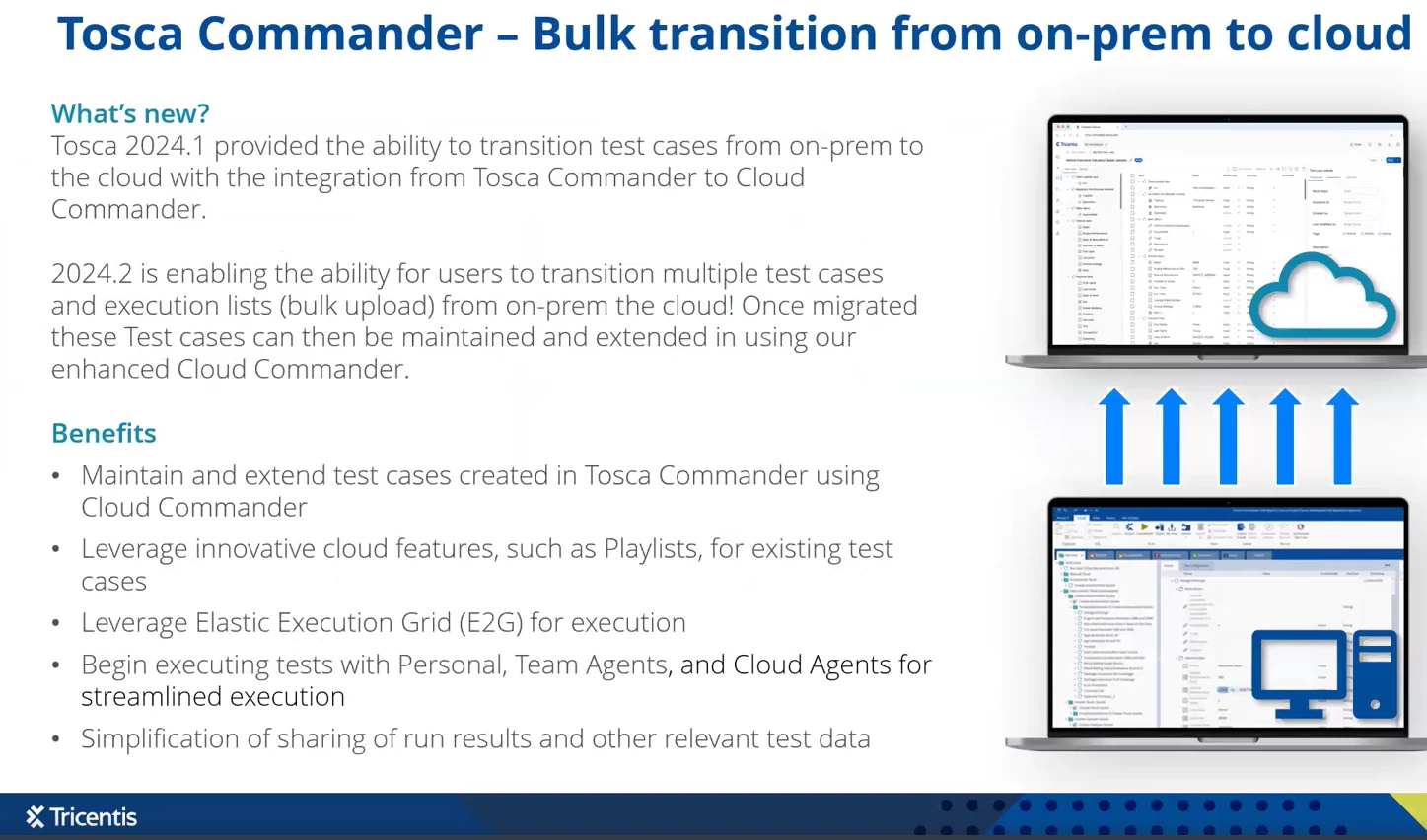
Tosca provides built-in integration to bulk-transition existing tests from on-premises into the cloud. Starting in Tosca 2024.2, you can select one or more modules, test cases, reusable TestStep blocks, or entire execution lists in your Tosca Commander and simply choose “Upload to Tosca Cloud”. The process works like this: you authenticate to your Tricentis Cloud tenant, pick a workspace, and click Upload. Tosca then copies the selected artifacts and their dependencies (modules, business parameters, data instances, etc.) into the cloud repository. This lets you rapidly build a complete cloud library from your existing test assets without recreating anything manually.
-
Bulk transition of tests: You can upload entire folders or execution lists at once. For example, selecting multiple test cases and clicking “Upload to Cloud” will push all of them in one operation. This accelerates migration by letting you seed the cloud with weeks or months of test development in just minutes. As one source puts it, Tosca now offers “bulk transition of tests to the cloud… allowing users to rapidly create and leverage robust test libraries in the cloud”.
-
All artifacts included: When tests are migrated, Tosca includes all related artifacts so they run correctly in the cloud. This means connected Modules, TestStep Blocks, and even test data instances get copied along with your test case. The cloud workspace preserves folder structure and data values, so a migrated test behaves just like it did on-prem. (Note that the cloud version is a separate copy – changes you make in cloud don’t auto-sync back to the on-prem version.)
-
In-cloud editing: Once tests are in the cloud, you can edit them directly in Cloud Commander. The same parameters, step values, and logic that existed on-prem can be modified without leaving the cloud interface. In fact, the new authoring experience in Tosca Cloud Commander was built to mimic the power of the desktop Editor: it supports all standard modules and allows full in-browser editing. For example, existing test cases uploaded from on-prem can be opened and updated (changing step values, adding checks, etc.) in Cloud Commander just as easily as if you were in the Tosca desktop client.
-
Advanced virtualization: To further boost cloud migration, Tosca Cloud includes next-gen API Simulation (service virtualization)tricentis.com. This means QA teams can spin up mock services or virtual APIs for any component that’s not ready, so end-to-end tests can run without delay. Such simulation is especially valuable in cloud environments, enabling continuous testing even when dependencies are incomplete.
Using the Tosca Cloud Interface
Tosca Cloud comes with a full web interface that should feel familiar to existing users. The Test Case Editor in Cloud Commander retains the same look and feel (asset panel on the left, logic builder in the middle, properties on the right). For example, when you click Create Test Case, you’ll see options to insert operations, loops, conditions, etc., just as in the on-prem client. All modules, test step libraries, and reusable test blocks that you’ve uploaded are immediately available in the cloud environment. In practice, this means you can drop in the same building blocks and values that you used on-prem, then enhance the test with any new cloud-specific steps you need.
The cloud UI also adds collaborative dashboards. By default you get views of test run status, pass/fail rates, and recently created artifacts, so stakeholders can quickly gauge overall health. (These dashboards were introduced with Tosca Cloud and will soon include richer reports and analytics.) Meanwhile, execution is managed via Playlists: you can bundle multiple tests into a playlist and execute them in sequence or parallel. Playlists can be run manually or triggered from CI/CD. The results and logs flow back into Cloud Commander, where they are visible alongside your test design.
In short, Tosca Cloud provides end-to-end coverage: you can create new tests in the cloud from scratch, using the same App scanners and building blocks as on-prem, or run existing tests via playlists and agents. All the standard technologies (web apps, mobile apps, desktop, PDFs, mainframes, etc.) are supported in Cloud Commander. As one Tricentis engineer put it, “all the tools and building blocks” that you used on-prem are “already available for you” in the cloud.
Hybrid Execution and Cloud Agents
A key advantage of Tosca’s cloud model is hybrid flexibility. You don’t have to rip-and-replace your entire setup overnight. For example, you can run a cloud-stored test on an existing on-premises agent. In our demos, an on-premises “Personal Agent” executed a test that was defined in Tosca Cloud, reporting results back to the cloud seamlessly. This hybrid approach means you can test anywhere: use on-prem agents for some tests and cloud agents for others.
Looking ahead, Tosca Cloud is introducing fully managed Cloud Agents (Elastic Execution Grid). These are virtual Tosca agents hosted by Tricentis: you queue a test and the cloud platform launches an agent instance to run it. This provides truly zero-footprint execution – no customer infrastructure at all. As described in Tosca documentation, “a cloud agent is an agent that’s hosted in the Tosca Cloud and fully maintained by [Tricentis]”. The system can spin up multiple cloud agents on demand and distributes tests across them efficiently. In practice, this means QA teams can take full advantage of cloud elasticity. For example, if you need to run 100 regression tests overnight, the cloud can automatically allocate dozens of agents in parallel and finish the job rapidly – all without you managing any VMs.
The move to cloud also simplifies CI/CD integration. Because cloud agents start on demand and can be tagged with characteristics, you can easily hook your tests into pipelines. Tosca Cloud preferentially uses your Team Agents (on-prem) if available, or Cloud Agents otherwise. And as the recent releases emphasize, dashboards and cloud-native test data management (TDM) are coming soon, which will further streamline continuous quality feedback.
Best Practices for Cloud Migration Testing
When shifting to cloud-based QA, teams should adopt some updated practices. For example, set up automated monitoring of your tests and applications during migration (tracking performance, errors, or resource usage). Integration testing should target cloud-specific scenarios like scaling behavior and resilience in a distributed environment. Likewise, include security and compliance testing of your cloud infrastructure as part of the suite. The built-in API simulation in Tosca Cloud can help here by enabling contract tests and early detection of integration issues.
It’s also important to continuously integrate your cloud tests into your DevOps pipeline. Ensure that each commit or build triggers relevant automated tests in Tosca Cloud, and use the cloud dashboards to catch failures early. Remember that cloud test suites can grow rapidly once infrastructure is no longer a constraint – use version control and workspace permissions to keep the library organized. By leveraging these best practices (continuous monitoring, CI/CD integration, broad coverage, etc.), QA teams can make the cloud migration smoother and reap the full benefits of faster, more reliable testing.
In summary
Moving Tosca to the cloud gives QA teams a cost-effective, scalable, and highly productive testing platform. You continue to use Tosca’s powerful model-based test approach, but with all the advantages of SaaS delivery: instant access, elastic execution, and seamless collaboration. Cloud-based testing reduces manual toil and hardware overhead, allowing testers to focus on crafting comprehensive test cases and analyzing results. As one Tricentis article notes, the cloud release is a “transformative step…providing a streamlined, cost-effective, and highly scalable solution for modern test automation”.
For a step-by-step walkthrough of this migration process (including a live demo), check out the Tricentis Expert Session: A simplified path for transitioning to Tosca’s cloud offering.
The on-demand session shows the exact workflows outlined above and offers additional tips on building a cloud-first testing strategy. Click the link to learn more and watch the full recording!

