


Ever wished your automated test results could instantly tell you which requirements they cover? This week’s tip explores how Tricentis qTest leverages AI to enhance automation integration with smart traceability and reporting. For QA teams juggling many tests, qTest’s AI-assisted features can automatically link test outcomes to requirements and deliver intelligent analytics on your test run data – all in one place. The result is a more connected, insightful view of your testing efforts, without the manual overhead.
Why Use AI-Powered Traceability in qTest?
Modern test management isn’t just about storing test cases – it’s about connecting the dots between user stories, tests, and results. Tricentis qTest is an AI-augmented test management tool designed for exactly this purpose. It provides unified visibility into your testing, with predictive insights and intelligent reporting that tie together requirements, test cases, and automation results. In practice, this means qTest can automatically maintain traceability across the software lifecycle – you always know which requirements have passing tests, which have failures, and which might be missing coverage. AI takes care of mapping and monitoring these links, so your team can make data-driven decisions fast.
How does it work? qTest pulls in data from all your sources – manual tests, automated frameworks, CI/CD pipelines, and even your defect tracker – into one reporting hub. Its AI then helps correlate and connect test results to the right requirements for you. The next time an automated test fails, qTest’s dashboard will show exactly which user story or requirement is impacted, maintaining end-to-end traceability without you lifting a finger.
AI-Assisted Mapping of Test Results to Requirements
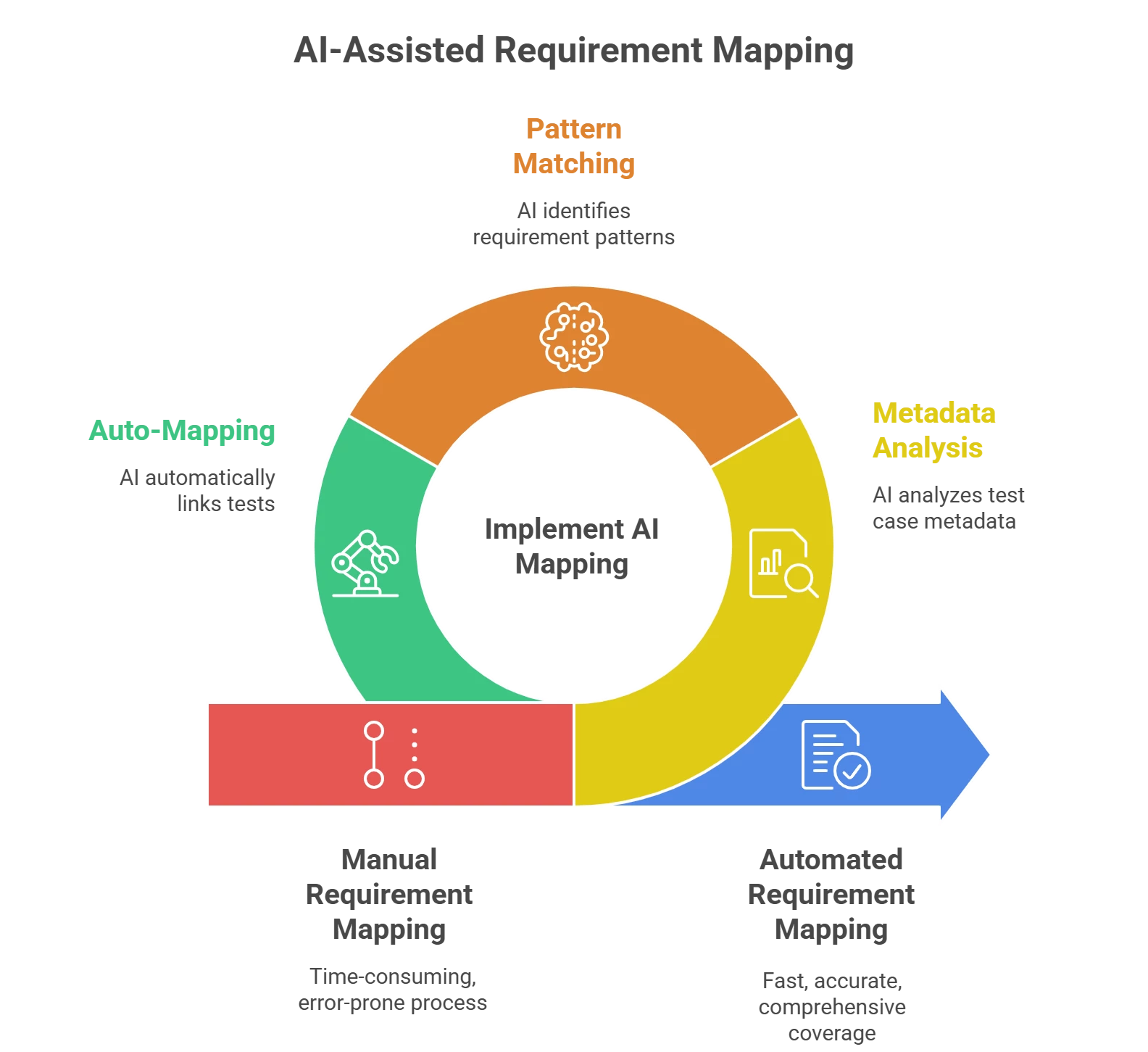
One lesser-known but powerful qTest capability is AI-assisted requirement mapping. Traditionally, QA teams had to manually link each test case to a requirement or user story. Now, qTest’s AI can streamline this by suggesting or auto-mapping those relationships based on metadata and context. For example, if your automated test is named or tagged after a requirement, qTest recognizes it and records the result under that requirement. This ensures no requirement slips through untested, and you can instantly see coverage gaps:
-
Comprehensive coverage at a glance: Every requirement in qTest can show linked test cases and their latest pass/fail status. If something’s untested or failing, you’ll know immediately in the traceability view.
-
Reduced manual effort: AI pattern-matching means fewer hours spent maintaining traceability matrices. qTest “connects requirements, tests, and results to improve traceability” on its own. You get up-to-date coverage info without constant updates.
-
Faster troubleshooting: When a test fails, qTest flags the associated requirement and even the defect (if logged) in reports. Teams can quickly pinpoint what feature might be broken, speeding up triage.
Intelligent Analytics in Test Run Data
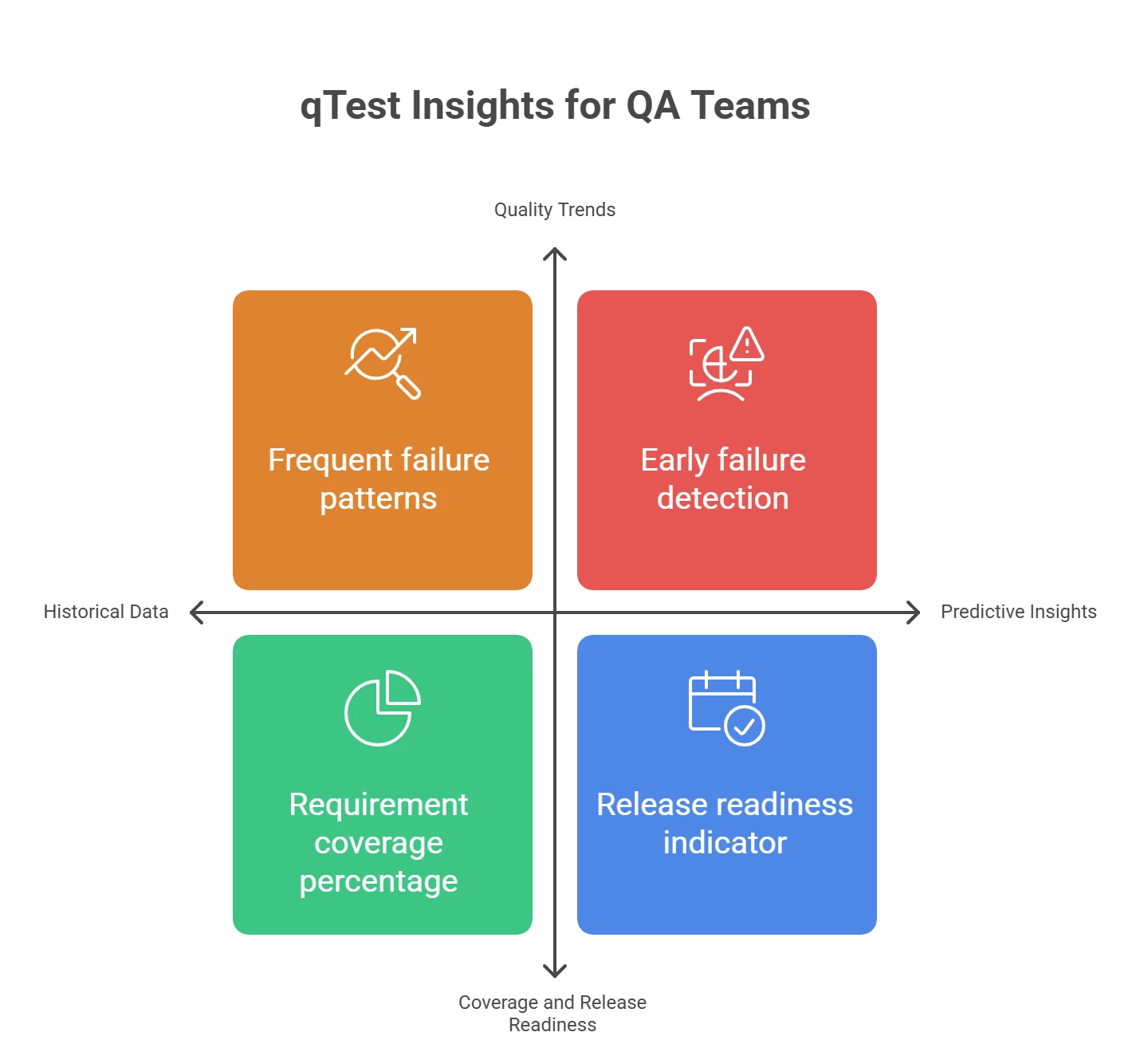
Beyond linking requirements, qTest’s AI-powered reporting turns raw test run data into actionable insights. The qTest Insights module aggregates data from across projects and tools (automation, CI, manual testing, etc.) into visual dashboards. Here’s how it helps QA teams make sense of automation results:
-
Quality trends: Out-of-the-box Quality Analysis dashboards plot your test run results and defect status over time. The AI can highlight patterns – for example, a particular module or requirement with frequent failures – so you can focus on high-risk areas first.
-
Coverage and release readiness: Built-in Coverage Analysis views show what percentage of requirements are covered by passing tests. Intelligent analytics might indicate if you’re ready for a release or if certain requirements lack sufficient tests.
-
Predictive insights: qTest’s analytics deliver predictive indicators by learning from historical data. If a spike in failures is detected, the system can flag it early. These AI-driven insights let you address issues “before they affect users,” guiding you to proactively improve quality.
(Tip: Use the interactive charts in qTest to drill down. For instance, click on a failing test in the dashboard to see details, and identify linked requirements or recent code changes. This intelligent slicing of data helps uncover root causes fast.)
Step-by-Step: Enabling AI-Powered Traceability in qTest
Ready to put this into action? Follow these beginner-friendly steps to enhance your automation management with qTest’s AI features:
-
Integrate your automation with qTest: In qTest, enable the Automation Integration for your project (via the project settings). Connect your automated testing tool or CI pipeline so that test results flow into qTest automatically. This is the foundation that allows AI to work with your test run data.
-
Ensure tests link to requirements: Create or import your requirements (user stories, etc.) in qTest, and align your test cases with them. You can do this by naming conventions or using qTest’s requirement ID in your test scripts. The more context you give, the better the AI can map results. (For example, if a test script references “REQ-123”, qTest will attach its outcome to requirement REQ-123 in the traceability report.)
-
Execute automated tests (via CI/CD or qTest Launch): Trigger your test suite – whether through Jenkins, Azure DevOps, or qTest’s own scheduler. As tests run, qTest records each result. The platform is built to integrate with any framework or tool, so you can orchestrate testing at scale and gather all results centrally.
-
View AI-enhanced traceability reports: After the run, log in to qTest and open the Traceability or Coverage report. You’ll see real-time mapping of test outcomes to requirements – green for passed, red for failed, etc. qTest’s AI will highlight any requirements with no tests or failing tests. Use this to quickly identify untested functionality or regressions.
-
Leverage insights for decision-making: Explore the qTest Insights dashboards for deeper analytics. Check the Quality Analysis chart to spot any spike in failures or a trend in defect counts. Review the Velocity Analysis to see if your testing pace is on track. These intelligent analytics help you decide where to add tests, when to rerun a suite, or whether a release is ready.
By following these steps, you’ll harness qTest’s AI to keep your automated testing efforts tightly aligned with your requirements and quality goals. The first setup might take a little configuration, but once in place, qTest acts like a smart QA assistant – continuously mapping, tracking, and analyzing your tests in the background.
Key Takeaways for QA Teams
-
Traceability made easy: Tricentis qTest uses AI to automatically connect your tests to what they validate, giving you confidence that every requirement is accounted for. No more guesswork or tedious manual mapping.
-
Data-driven QA: With unified dashboards and AI analytics, qTest turns piles of test results into clear visuals and predictions. Even beginners can interpret which areas are high-risk or whether the team is ready to release.
-
Practical and scalable: These AI features are not just gimmicks – they solve everyday testing pains. Whether you have 100 tests or 10,000, qTest’s AI-powered traceability and reporting scales with you, ensuring nothing falls through the cracks in your automation strategy.
Give this lesser-known qTest capability a try in your next sprint. By letting AI handle the heavy lifting in traceability and reporting, your QA team can focus on designing better tests and catching more bugs – while staying confidently informed by qTest’s smart insights every step of the way!

