

Introducing Agentic Test Automation with Tricentis Tosca
In the ever-evolving world of software testing, AI is opening up transformative possibilities for QA teams. Tricentis has leveraged its years of AI innovation (from Vision AI to self-healing tests) to introduce Agentic Test Automation – an AI-powered “co-worker” embedded in Tricentis Tosca that can autonomously generate and execute test cases from natural language descriptions. This advanced capability is poised to revolutionize how QA engineers and software testers design automated tests, addressing modern challenges of scale and complexity in software delivery.
Modern Testing Challenges and the Need for AI Assistance
Development cycles are accelerating and codebases are growing larger than ever. With the advent of generative coding tools, developers can produce code at unprecedented speed – but this leaves QA teams scrambling to test more functionality in less time. Moreover, AI-generated code can introduce unexpected issues and variations, demanding smarter testing strategies. Traditional test automation, which often requires manual scripting or modeling of tests, struggles to keep pace with these demands.
Agentic Test Automation directly tackles this problem. By harnessing cutting-edge AI (large language models and vision recognition), it can generate complete, ready-to-run automated test cases from a simple prompt. This means even as development outputs explode, testers have an intelligent assistant to instantly create the bulk of their test automation. QA teams can thus scale up coverage without a proportional increase in manual effort.
What is Agentic Test Automation in Tosca?
Agentic Test Automation is a new feature set within Tricentis Tosca (the flagship test automation platform) that introduces an autonomous AI agent into the test creation process. In essence, it allows you to describe a test scenario in natural language and have the AI generate a full automated test for you – including the test steps and the underlying modules (screen/object mappings) needed to execute those steps. This isn’t a generic chatbot bolted on top of Tosca; it’s a deeply integrated capability that understands Tosca’s model-based testing paradigm and testing best practices.
Some defining characteristics of Tricentis’s agentic approach include:
-
Embedded Domain Knowledge: The agent is embedded in the Tosca framework and was trained on Tricentis’s decades of testing expertise. Unlike a third-party AI, it “speaks” Tosca. It understands concepts like Modules, TestCases, and TestSteps inherent to model-based test automation. For example, it knows how to structure tests using Tosca’s modules and can design steps that adhere to Tosca’s methodology. This means the output isn’t just pseudo-code or plain text instructions – it’s actual Tosca test assets ready to use, following the right modeling conventions.
-
Natural Language Prompting: Agentic Test Automation works through simple prompts. Testers can input a manual test case description or user story in plain English, and the AI will autonomously translate that into an automated test. There’s no need to learn a special scripting language or be an AI expert – the prompt can be as straightforward as writing steps for a colleague. In the webinar demo, for instance, a user pasted the steps of a manual test (“click the drop-down, fill the vendor data, enter values in fields, add items to the table, etc.”) and the AI interpreted it just like a human tester would. This lowers the skill barrier for automation – even testers not deeply familiar with Tosca or the application under test can produce an automated case because the AI bridges the knowledge gap.
-
No Training or Setup Overhead: The AI agent comes pre-trained and ready to use out-of-the-box. You don’t need to train it on your own applications or provide thousands of examples. Tricentis has done that heavy lifting by infusing the agent with knowledge of common UI patterns and Tosca operations. As Adnan (Product Marketing Manager at Tricentis) highlighted, “it is immediately ready to use – you don’t need to train this AI model at all. You can start right away”. Additionally, any data or prompts you enter are not used to further train the AI, addressing privacy concerns. In short, you can safely leverage the AI on your proprietary applications; it won’t leak or learn from your specific data.
-
Vision AI for Technology-Agnostic Automation: Under the hood, Agentic Test Automation leverages Tricentis’s Vision AI technology for interacting with the system under test. Vision AI is an image-based recognition engine that identifies UI elements (fields, buttons, tables, etc.) on the screen using computer vision, rather than relying on traditional DOM/XPath or technical IDs. This makes the solution highly technology-agnostic – the AI agent can work on any UI that Vision AI can see, from SAP Fiori web apps to legacy desktop applications, without requiring a custom engine for each technology. In the initial release, SAP Fiori (web) is fully supported and web applications in general are in beta, with future updates planned to extend native support via Tosca’s classic engines (more on that in the roadmap below). The key point is that the AI uses a visual understanding of the application, so it can operate even in contexts where it hasn’t been explicitly programmed – a major step toward autonomous, tool-agnostic testing.
-
“Co-Worker” Mode of Operation: The term “agentic” implies the AI agent has a level of autonomy, but Tricentis emphasizes a human-in-the-loop partnership. Agentic Test Automation is designed to function like a co-pilot or co-worker to the human tester. Practically, this is implemented via two user-selectable modes:
-
Autonomous Mode: a fully hands-off mode (likened to “level 5 autonomy” in the webinar) where you give the prompt and the AI does everything from generating the steps to executing them, without pausing for confirmation. It’s “cruising with no hands on the wheel”. This is great for short, straightforward scenarios or quick initial drafts of tests.
-
Co-Create Mode: a more interactive mode (think “level 3 autonomy”) where the AI breaks the task into smaller steps and asks for your confirmation or input at key junctures. For example, after generating or executing a complex step (like selecting a value from a drop-down or filling a table form), it will pause and prompt “Is this correct? Should I proceed?”. This mode is recommended for longer, more complex test scenarios or whenever you want greater control to ensure accuracy. It helps mitigate LLM “hallucinations” or memory issues on lengthy tasks by regularly syncing with the user’s intent. In practice, many beta users found the Co-Create mode very effective for guiding the AI through a scenario step-by-step, almost like pair-programming a test case with the AI. On the other hand, if you have a short scenario (few steps) and are confident in the prompt, Autonomous mode can get you results faster. Both modes ultimately produce the same kind of automated test output; it’s just a matter of how much you want to supervise the generation process.
-
-
Transparency and Step-by-Step Insight: Regardless of mode, Tricentis designed the interface to be transparent about what the AI is doing. As the agent works, Tosca presents a “step designer” or activity log that shows the actions being taken (or planned) by the AI. You can watch the test steps being built and even edit them on the fly if something looks amiss. For example, if the AI misunderstood a step description and selected the wrong screen or entered an incorrect value, you can catch it in the step preview and correct it before execution. This transparency is crucial in establishing trust – the tester remains in the driver’s seat, verifying the AI’s output before fully committing to it. As Adnan noted, “one part [of the interface] is where you work with the AI, but the other part is where you can see what the AI is doing… you can still steer and control what the AI is doing, step by step, if desired”.
-
Test Data and Context Injection: Realistic test automation requires test data – without proper input values, many business processes can’t execute. Agentic Test Automation allows users to provide context and test data as part of the prompt or via attachments. For instance, in your natural language description you might say, “use customer ID 12345” or “enter username = JohnDoe, password = XYZ”, and the AI will use those exact values in the test steps. Alternatively, you can attach a file (currently supported formats are plain text or JSON, with CSV support on the roadmap) containing test data or additional context, which the AI will parse and apply during test generation. This is particularly useful if you want to generate multiple tests or a data-driven test – you could provide a list of test inputs and have the AI iterate or incorporate them. While the AI is powerful, it isn’t psychic – it needs to know what data to use for things like form fields. So, providing that in the prompt (just as you would specify data in a manual test case) results in a more accurate, executable automated test. If you leave data values out, the AI may attempt reasonable defaults, but it’s best practice to supply any specific data that the test logic depends on.
-
Instant Tosca Integration: Perhaps one of the most valuable aspects of Agentic Test Automation is that the output is directly integrated into Tosca. When the AI finishes creating a test, it doesn’t give you a blob of pseudo-code or a Word document – it creates the test case and modules inside Tosca itself. In the demo, after the agent executed the scenario, the presenters showed the Tosca workspace containing the newly generated Modules (for each screen or UI component the AI interacted with) and a TestCase composed of the automated TestSteps. The AI even generates human-readable descriptions for each step, so the test is self-documenting. From there, you can treat it like any Tosca test: you can run it, edit it, parameterize it, add it to test suites, etc. The modules it created are standard Tosca Modules – meaning you can reuse them in other tests or refine them using Tosca’s scanning if needed. This seamless integration eliminates any import/export or translation effort. Your AI-generated tests live side by side with manually created tests in Tosca.
-
Human Oversight and Editing: While the AI strives to produce a correct and optimized test case, it’s not infallible. Tricentis is upfront that the agent will typically get you “80–90%” of the way there, and some human fine-tuning may be required. This residual work could include adjusting a control that was misidentified, tweaking a verification, or enriching the test with additional business checks. The good news is that performing these edits in Tosca is much faster than creating the entire test from scratch. For example, if a field was populated with an unintended value and caused a failure, you can simply change that value in the Tosca test step and update the Module if necessary. The webinar demo showed that when an incorrect value caused an error in an SAP form, the presenter paused the AI execution, manually fixed the value, and resumed the run. After finishing, they went into Tosca and updated the test case with the correct value permanently. The ability to pause and intervene during execution is a huge time-saver – you don’t have to restart the entire generation process just for one fix. As the presenter said, if you’re 10 minutes into a test and one field fails, “just because of one field, you’re not gonna start over – it’s a waste of time. Better to pause, put the right value, and continue”. This interactive error handling ensures you salvage the work done so far and quickly reach a correct end state. Ultimately, the AI aims to handle the heavy lifting of assembling the test, while the tester provides guidance and final approval. The net effect is a significant productivity boost without losing the critical mindset of a human tester. You’re still thinking about test coverage and correctness – the AI just accelerates the implementation.
Key Benefits and Early Results
Agentic Test Automation brings tangible benefits for software testing teams, especially in large enterprise environments:
-
Dramatic Time Savings: Early adopters have reported that using the AI agent can cut down test creation effort by up to 85%. What might have taken a tester hours to automate (setting up modules, writing out all the steps, debugging identification issues) can be achieved in minutes. In the live demo, a real user’s scenario was discussed: a test that normally took about an hour to automate manually was generated by the agent in ~15 minutes – roughly a 75% reduction in time. This efficiency gain means teams can automate more tests in the same amount of time, accelerating regression suite growth and freeing testers to focus on complex scenarios or edge cases.
-
Enhanced Productivity and Focus: By offloading the grunt work of writing boilerplate automation steps, the AI allows testers to concentrate on high-value activities. Tricentis notes overall productivity boosts up to 60% when the agent is used. In practical terms, testers can spend their time designing better test coverage, analyzing results, and doing exploratory testing, instead of painstakingly coding automation. The AI acts as a force-multiplier – junior testers or those less familiar with a given application can still produce automated cases (the AI fills in the knowledge gaps), and senior testers can oversee multiple test creations in parallel by guiding the AI. This can significantly shorten testing cycles and help QA keep up with the rapid development pace.
-
Consistency and Best Practices: Because the agent is built on Tricentis’s best practices, it tends to produce consistent, well-structured tests. It will create modules and steer controls in a standard way each time. This consistency means easier maintenance and readability. It also enforces good practices (for example, it might automatically include a synchronization step if needed, or use stable identification techniques via Vision AI) that a human might forget under time pressure. Essentially, it’s like having an experienced automation engineer instantly implement the first draft of every test case for you.
-
Lower Barrier to Automation (Upskilling): Not every tester is a test automation expert, and not every domain expert has coding skills. Agentic Test Automation helps democratize test automation by enabling people with basic testing knowledge to create working automated tests using plain language. A manual QA engineer can describe the test they want, and the AI will handle the translation to automation. This is powerful for upskilling teams – instead of a hard division between manual and automation testers, anyone on the QA team can contribute to automation creation with minimal training on Tosca. The AI’s understanding of Tosca means new users don’t have to fully learn the tool before getting value from it. Over time, as they review the AI’s outputs, they organically learn Tosca and automation patterns, accelerating the team’s overall competency.
-
Flexibility and Continuous Improvement: Agentic Test Automation is not a static feature – it’s under continuous development with input from its users. As AI technology evolves, Tricentis is improving the agent’s accuracy and expanding its capabilities (as outlined in the roadmap below). Testers also have the flexibility to use Tricentis’s provided AI or bring in their own models via the MCP (Model Context Protocol) interface. This means the solution can adapt to different organizational needs and policies (for example, using an on-prem LLM for sensitive projects). The underlying AI models will get better over time (Tricentis expects much better performance in the next year, as the presenter hinted), and customers can benefit from those improvements seamlessly.
In summary, Agentic Test Automation empowers QA teams to meet the twin challenges of speed and quality in modern software delivery. It combines AI-generated speed with human-guided intelligence, resulting in faster test creation without sacrificing the insight and oversight that professional testers provide. The outcome is a significantly more efficient testing process – one that is critical as organizations strive for continuous testing in CI/CD pipelines and “shift-left” quality at the pace of agile development.
Demonstration: From Prompt to Automated Test Case (Step by Step)
To understand how Agentic Test Automation works in practice, let’s walk through the typical workflow demonstrated in the Tricentis expert session. The scenario involves creating a test for an SAP Fiori application (a web-based SAP interface) using the AI agent. Here’s how the process unfolds:
1. Set up the environment: Ensure you have Tricentis Tosca v2024.1 or later (the feature is new, and Tricentis recommends the latest 2024.2 version for best compatibility). Agentic Test Automation is delivered as a Tosca add-on – you can download the latest version of the add-on (e.g., version 1.4.4 as of the webinar) from the Tricentis Support Hub and install it into your Tosca environment. Also make sure Tosca’s Vision AI is enabled and connected to your Tricentis account (for cloud-based AI services). Users must log in with their Tricentis credentials (Tosca tenant) to authenticate the AI agent, but Tosca will auto-provision the Vision AI service for your session. In short, a valid Tosca license and internet connectivity (for cloud AI calls) are prerequisites.
2. Launch the Agentic Testing interface: In Tosca Commander, after installing the add-on, you’ll have a new option (or window) for Agentic Test Automation. In the demo, the presenter opened the Agentic interface which prompted for selecting the target Application under test. For example, they chose an SAP Fiori application from a dropdown. At this point, the agent knows the context (SAP web UI) and even displays a sample prompt template to help you structure your request. (If it’s a “generic web application,” the interface provides a slightly different template, usually a more step-by-step format with actions and expected results).
3. Enter the test scenario in natural language: This is the core step – you provide the instructions or user story that you want automated. You can either free-type a description or copy-paste an existing manual test case. In our example, suppose we want to test creating a purchase order in SAP. A suitable prompt might be: “Open the Purchase Order app. Click ‘Create New’. Select vendor ABC Corp. Enter today’s date as the order date. Add an item with product ID 1234 and quantity 10. Save the purchase order and verify that a confirmation message appears.” This reads like a set of manual test steps, which is perfect. In the demo, the presenter pasted a similar set of instructions for creating a purchase order – including which dropdowns to click and what data to fill in. They emphasized that no special syntax is needed; you write it as if you’re instructing a colleague. The AI is designed to interpret commonsense descriptions of UI actions (clicking, inputting text, selecting values, etc.). If you have specific test data, include it in the steps (e.g., vendor name or an order number). Remember, you can also attach a file at this point if you have a lot of data or context – for instance, a JSON file with multiple sets of input values, or a text file containing prerequisite details. Attaching such a file is as simple as clicking the “attach” option and selecting your file; the AI will incorporate that information when generating the test.
4. Choose the automation mode: Before running the AI, decide whether to use Autonomous mode or Co-Create mode. The interface will let you pick one (often via a toggle or radio button). In Autonomous mode, the AI will take your prompt and immediately attempt to generate and execute the entire test without further user intervention. In Co-Create mode, it will go step by step, confirming each segment with you. In the webinar, the presenters showed that Co-Create mode is especially useful for complex steps like handling drop-down menus or table inputs – the agent will execute one step, then ask “What’s next?” so you can guide it if needed. For our example, if using Co-Create, the AI might say “I’ve opened the app and clicked ‘Create New’. Should I proceed to select the vendor ABC Corp?” – giving you a chance to confirm that it identified the correct control for vendor selection. For initial trials, many users prefer Co-Create to build trust with the AI’s actions. You can always mix and match: start in Co-Create for a tricky part, then let it autonomous for the rest, or vice versa.
5. Send the prompt to the AI: Hit the “Run” or “Send” button to initiate the agent. Tosca will now hand over the instructions to the AI agent which will interpret them and begin formulating a test case. Right away, you will see a Step Designer panel populate with the steps the AI is creating. For example, it might list out: Step 1 – “Click [New Purchase Order] button”; Step 2 – “Select [Vendor] = ABC Corp from dropdown”; Step 3 – “Enter [Order Date] = <today’s date>”, and so on. This is the AI’s draft interpretation of your instructions, shown in real-time. It’s essentially asking, “Does this align with what you intended?” If something looks wrong (maybe it chose the wrong screen or you forgot to include a step like logging in), you can edit the steps or prompt at this stage. The Co-Create mode inherently pauses for confirmation at each complex step, whereas in Autonomous mode you might quickly hit a summary screen of all steps. In either case, you have an opportunity to adjust before execution. The presenters noted that sometimes the AI might hallucinate an extra step or misunderstand ambiguous wording (especially if the application has many similar processes). For instance, if your description isn’t specific enough, the agent might pick a similarly named transaction. That’s why providing clear context (application name, screen titles, etc.) is helpful. In our example, ensuring we said “Create New Purchase Order” and referencing actual field labels helps the AI map the steps correctly. If the AI guessed a screen name incorrectly, you can simply rename it in the step list before proceeding. This review phase is a major advantage of Tosca’s implementation – you see the automation before it runs.
6. Let the AI execute the steps: After validating the step design, you proceed to execution. The AI agent will now drive the application under test, performing each step using Vision AI to interact with UI elements. In Tosca, you will see the application being controlled: windows switching, fields being populated, buttons clicked – as if a very fast, invisible engineer is operating it. The Step Designer will tick off steps as they complete. Continuing our example, the AI would launch the Purchase Order app (if not already open), click the “Create New” button, select “ABC Corp” in the Vendor dropdown, and so on. Each action corresponds to the step it planned. Behind the scenes, the AI is combining image processing with natural language understanding to locate the right controls and input values. It doesn’t have a built-in knowledge of “ABC Corp” or “today’s date” – it deduced from your prompt where to put those values. Vision AI identifies the label “Vendor” on the screen and selects the dropdown next to it, then Vision AI finds “ABC Corp” in the list and clicks it, for example. This is a showcase of AI-driven automation where the agent makes decisions on the fly about how to fulfill each instruction.
During execution, avoid interfering with the application (don’t move the mouse or switch windows) because the Vision AI needs a stable view to work with. However, Tosca provides controls to pause or stop the run if needed. Why might you pause? Perhaps you notice the AI is going down a wrong path (maybe it clicked “Create Invoice” by mistake, thinking it was “Create Order”). Or maybe an unexpected modal dialog popped up. By pausing, you can regain manual control. In the webinar demo, the presenter intentionally introduced an error by having the AI enter an invalid value, causing the application to show an error message. They then paused the agent, manually corrected the value in the application, and resumed the execution. This flexibility is great – it means a minor hiccup doesn’t ruin the whole automated sequence. The AI will continue from where it left off once resumed. If Co-Create mode is active, the AI might automatically pause at each step waiting for your confirmation to proceed, which is effectively a controlled pause after every action.
7. Handle errors and confirm completion: If an error occurs (like a validation message due to bad test data), you have two choices: edit on the fly (pause, fix, continue as described) or let the AI fail and then adjust after. Often, it’s faster to pause and fix during the run. In our example, after resuming with the correct vendor value, the AI successfully completed all steps – e.g., added the item, saved the order, and perhaps checked for the confirmation. The test execution (the “demo run”) is now done. The Step Designer likely indicates completion, and you should see a success or failure status for each step. At this point, the agent compiles the final output.
8. Save the generated test case into Tosca: When the agent finishes (or when you click a “Save”/“Import” button), it will export the entire test case into Tosca as a new TestCase in your workspace. This includes all the Modules (screen objects) it used. In the demo, after completion, they expanded the newly created test case in Tosca to show all the steps and their linked modules. The structure was neatly laid out, and names were given based on the context (e.g., a Module might be named “Purchase Order – Vendor Dropdown”, and a step might be “Select Vendor = ABC Corp”). At this stage, you treat it like any Tosca test: you might want to do a bit of cleanup or enhancement. Common tasks could include: adding assertions if the AI didn’t automatically include them (maybe verify the confirmation message text), parameterizing the test if you plan to reuse it with multiple data sets, or simply refactoring module names for clarity. The AI tries to provide a decent description for each step and module, reducing documentation effort. As noted earlier, if you encountered an error and corrected it during the run, don’t forget to update the test in Tosca with that correction (the AI might have logged the original wrong value in the steps). In the webinar, after the run, they edited the TestCase in Tosca to replace the faulty value with the correct one, ensuring the test will run end-to-end successfully next time. This is an important takeaway: agent-generated tests are not “set in stone” – you have full freedom to tweak them. In fact, Tricentis expects you will often make a few minor adjustments, which is normal for any recorded or generated test. Even with those tweaks, the effort is far less than writing from scratch.
Once saved, you now have a fully functional automated test case. You can execute it like any other Tosca test (with Tosca Executor or in CI pipelines), include it in regression sets, and clone or extend it. The Modules created (for screens like “Purchase Order form”) can be reused for other tests you create manually or with the AI. For example, if you later generate a test for editing a purchase order, the AI might recognize some of the same screens and reuse the existing Modules – Tricentis is working on making the agent smart about recognizing and reusing modules when available, to avoid duplicate objects. This capability is slated for improvement in upcoming versions (currently, each run tends to create new modules, but module reuse is on the roadmap).
In summary, the demo showed that with just a brief natural-language prompt and a few minutes of AI processing, a complete end-to-end test (that would normally require dozens of manual steps to automate) was created and executed successfully. The human tester’s role was mainly to provide the scenario and then oversee and correct the AI’s work at a couple of points – a far more efficient division of labor. The result was a working automated test case achieved in a fraction of the usual time.
Best Practices for Using Agentic AI in Testing
To get the most out of Agentic Test Automation, consider these best practices (gleaned from Tricentis’s guidance and early user feedback):
-
Provide Clear Context in Prompts: Be as specific and descriptive as reasonable when writing your prompt. Name the application or module you’re working with, include UI element labels if you know them, and specify the end goal. The AI will do its best with whatever you give it, but a well-described manual test case will yield a better automated test. For example, saying “Select the Vendor dropdown and choose ‘ABC Corp’” is clearer than “Choose a value in the first dropdown.” The latter might confuse the AI if there are multiple dropdowns on the screen. Also, if your organization’s processes have unique names, include those. The agent has knowledge of common enterprise apps (like SAP transactions), but if it’s something custom, clarity helps. As the presenters advised, “better to provide as much context as possible” to avoid the AI guessing incorrectly.
-
Leverage Co-Create for Complex Flows: If you plan to generate a very long test case (dozens of steps) or one with conditional logic, it’s wise to use Co-Create mode. Long prompts can sometimes exceed the AI’s optimal memory, causing it to lose track of earlier details (a common issue with LLMs). Co-Create breaks the process into chunks and keeps things on track with your validation. Also, for any non-standard UI or tricky validation, step-by-step confirmation prevents the AI from going too far down a wrong path. You can always speed through confirmations if everything looks good, but having that checkpoint can save time in the long run.
-
Don’t Skip Test Data: If your test needs specific input values, supply them. If you have a set of data combinations to run (data-driven testing), you might generate one automated test with the AI, then use Tosca’s TestCase templates or loops to cover the data variations. Tricentis is looking at allowing multiple data sets via attachments to generate multi-run tests, but even now you can at least get one flow automated and then copy it for different data. The key is the AI isn’t magically sourcing business data – whatever it enters, either you told it or it assumed a placeholder. For realistic tests (especially in SAP where field values must be valid master data), feed it the values or attach a file. The AI can parse simple structured text or JSON where you list field-value pairs, and this can be more efficient than writing a very long sentence.
-
Review and Edit the Output: Treat the AI’s output as you would a junior engineer’s work: review it for completeness and correctness. It’s much faster to review than to create, but a quick pass can catch subtle issues. For example, maybe the AI didn’t include a verification at the end (does the confirmation message appear?). You might want to add a verification step manually in Tosca to assert the expected outcome – something the AI could not infer unless your prompt explicitly said “verify X”. Also, ensure that the naming of tests and modules is meaningful for future maintenance. The AI might give a generic name like “Standard_PO_Module1”. You could rename it to “PurchaseOrder_MainForm” for clarity. These small tweaks will help maintain the automated suite in the long run. As Tricentis points out, expect to do that last 10-15% of fine-tuning yourself – the goal is a partnership, not fully hands-off (at least at the current state of AI).
-
Stay Up-to-Date: Agentic Test Automation is rapidly evolving. Tricentis is releasing frequent updates (both to the cloud AI models and the Tosca integration). Stay on the latest Tosca patches and update the Agentic add-on when new versions come out. New versions will improve accuracy, add features like module reuse, and expand technology support. For instance, if you start with Tosca 2024.1, keep an eye on 2024.2 or 2025.1 releases, which might bundle significant enhancements. Being on current versions ensures you get the best results and support.
-
Mind the Free Prompt Usage: Tricentis has made the agentic automation capability available to all Tosca users (including on-premises) with an initial free allotment of AI prompts. This means you can try it out without needing an immediate purchase or add-on license. However, the free usage is not unlimited – it will be a certain number of prompts per time period (exact numbers TBD, but for example, X prompts per month reset on a rolling basis). This is generous, as it provides continuous opportunities to experiment and even do real work with the AI agent at no extra cost. The idea is to let teams familiarize themselves and prove the ROI. If you find yourself hitting the free limit regularly, that’s a good problem – it likely means the feature is delivering value and you might consider expanding usage (Tricentis will offer it as a premium capability beyond the free tier). In any case, during free usage, make your prompts count: try to consolidate steps logically rather than spamming one prompt per action. The interface encourages you to input a whole flow anyway, which is efficient. And don’t worry – there’s no need to engineer “tricky” prompts. In fact, Adnan emphasized “don’t try to be a prompt engineer… just paste the manual test and let the AI do the rest”. The agent was built to understand straightforward instructions, so you can save your mental energy for test design rather than prompt design.
Following these best practices will help you get smooth and effective results as you incorporate agentic automation into your QA process.
Under the Hood: How It Works (AI and Architecture)
It’s worth briefly explaining how Tosca’s Agentic Test Automation actually works behind the scenes, as this illuminates its current capabilities and future direction:
-
Large Language Models (LLMs): The core of the agent is powered by advanced LLMs (similar to GPT-style models) that have been specialized for software testing tasks. These models interpret your natural language prompt and plan the sequence of actions to perform. Tricentis has trained these models on a vast corpus of testing knowledge, including Tosca-specific syntax and common enterprise application interactions. When you hit “Send”, your prompt (plus any provided context data) is sent securely to Tricentis’s AI cloud service, where the LLM processes it and responds with a structured action plan (the steps). Tosca then executes these steps via Vision AI. It’s important to note that at GA launch, you are using Tricentis’s provided AI models (which are optimized for this purpose). However, Tricentis is building the groundwork to allow “Bring Your Own LLM”. Through the Model Context Protocol (MCP) server, customers will have an open interface to plug in their own AI model endpoints in the future. For example, an enterprise might prefer to use OpenAI’s GPT-4 (with their own API key and data controls) or an on-premise large model for privacy reasons. Tricentis’s remote MCP servers act as the bridge between Tosca and any AI model – akin to a universal adapter that standardizes communication. This is a strategic design: today you use Tricentis’s built-in AI agent, tomorrow you could swap in another AI, and Tosca would work just the same. It ensures the solution is future-proof and flexible. In fact, Tricentis is the first major testing platform to introduce such an open AI integration layer, letting customers co-develop or plug in AI of their choice without losing the benefits of Tosca’s framework.
-
Vision AI for Element Identification: As mentioned, Vision AI is Tosca’s mechanism to interact with the application UI. Instead of relying on object properties or HTML IDs (which can be brittle or require engine configs), Vision AI looks at the screen like a human does. It classifies controls by their appearance and context – e.g., identifying a button versus an input field, and reading the text labels around them. This means the AI agent can work on virtually any GUI platform (web, desktop, remote, etc.) as long as it can capture the screen. There’s an initial setup where Vision AI needs to know your Tosca tenant so it can authenticate and perhaps allocate necessary resources (this was the login step in the demo). Once running, Vision AI sends images of the application windows to the AI service for analysis in real time. One thing to keep in mind: because Vision AI uses the rendered UI, the resolution and scaling of your screen matters. The demo advised to use a standard resolution and 100% scaling (and to maximize the application window) for best results. This ensures the AI “sees” everything without distortion or hidden elements. If using a non-standard DPI or if the window is partially off-screen, Vision AI might miss elements. So, a bit of environment prep (standardizing display settings on test machines) will help.
-
Tosca Engines (Roadmap): While Vision AI covers a lot of ground, certain technologies (especially non-visual or highly dynamic UIs) might benefit from a direct engine integration. Tricentis has a robust set of engines (TBox) for web, desktop, SAP GUI, mobile, etc. On the roadmap, Tricentis plans to integrate the agent with these native engines as well. This means in the future the AI could choose the best method to interact: either via Vision AI or via a native engine or a mix. For example, for SAP GUI (the older Windows-based SAP interface), Vision AI could work, but a direct UI engine might be more efficient and provide better validation hooks. Tricentis announced that support for SAP GUI is coming shortly, along with broader HTML web support, Java and .NET desktop apps, and even mobile down the line. Essentially, whatever Tosca can automate today with its engines, the AI will eventually be able to drive as well. This is exciting because it extends agentic automation into all areas of enterprise technology (Oracle, Salesforce, mainframes – you name it). Salesforce, for example, is just another web app to Tosca’s AI, so it will be covered under the HTML engine support. The move to integrate TBox engines will also help with things like identifying existing Modules (so the AI doesn’t duplicate what you have) and maintaining tests when apps change. In the initial release, if your app’s UI changes significantly, you would regenerate or manually update the Tosca test. But a future goal is for the AI to assist in maintenance – recognizing a changed screen and adjusting the test automatically (akin to self-healing on steroids). Tricentis indicated that after enabling module reuse, module maintenance is the next milestone on the roadmap, bringing true lifecycle support to agentic tests.
-
Integration with QA Ecosystem: Agentic Test Automation is part of a bigger vision from Tricentis around what they call “Agentic AI” in software quality. The idea is to have a suite of AI agents each handling different testing tasks and cooperating. We’ve discussed the test creation agent in detail. But Tricentis is also beta-launching AI Workflows – chat-based interfaces for tasks like test planning, result analysis, and more. For example, there could be an AI agent that, given a user story or requirement, drafts the high-level test cases (a “Test Design” agent). Another agent might analyze test execution logs and summarize failures or suggest which areas to focus on next (a “Quality Insights” agent). In fact, Tosca had a feature called Tosca Chatbot/Copilot that could answer questions about your test assets (like “explain what this test does” or “summarize last run results”). These Copilot features are being merged into Agentic Test Automation offering as well. That means the same interface where you generate tests can also answer your questions about tests, help with TQL queries, provide quick insights, etc. All these AI capabilities are gradually unifying into an “AI assistant” hub within Tosca. Tricentis envisions this extending across their product portfolio: we might see agentic performance testing (NeoLoad generating load test scripts from prompts), agentic data management (provisioning test data via AI), and integration with analytics platforms like SeaLights to advise on optimal test coverage. The ultimate goal described was a “Team in a Box” – a collection of AI co-workers each specialized (one generates manual test ideas from requirements, another turns them into automated tests, another monitors test results and risk) working together in a workflow. Agentic Test Automation is the first concrete realization of this strategy, focused on automated functional testing. But it’s just the beginning of a broader AI-driven quality engineering platform.
-
Security and Control: With AI being cloud-based, enterprises often worry about data security. Tricentis has addressed this by ensuring that any data sent to the AI (your prompts, screenshots, etc.) is handled under strict AI data usage policies – e.g., not used to train public models, not stored beyond what’s necessary to return results, and transmitted securely. They’ve also offered options like an on-premises MCP server and even an on-prem option for the SeaLights analytics if needed So if an organization has a policy against cloud AI, they could run a local model via MCP and still use the Tosca agent interface – thus keeping everything internal. This flexible architecture ensures companies can adopt agentic AI at their own comfort level with governance.
To sum up the technical side: Tricentis Agentic Test Automation combines LLM-based reasoning with Vision AI-based execution, all within the robust container of Tosca’s automation platform. It is built to be open and extensible, so it can adapt to different AI models and integrate with various tools in the SDLC. The heavy emphasis on integrating with existing tools (like qTest for test management, NeoLoad for performance, etc., via MCP) means Tricentis isn’t looking to create an AI that replaces everything, but rather one that orchestrates and enhances the testing activities across the board. This approach bodes well for the future, as it can unify the testing process with AI without forcing companies to rip out their current toolchain.
Getting Started with Agentic Test Automation
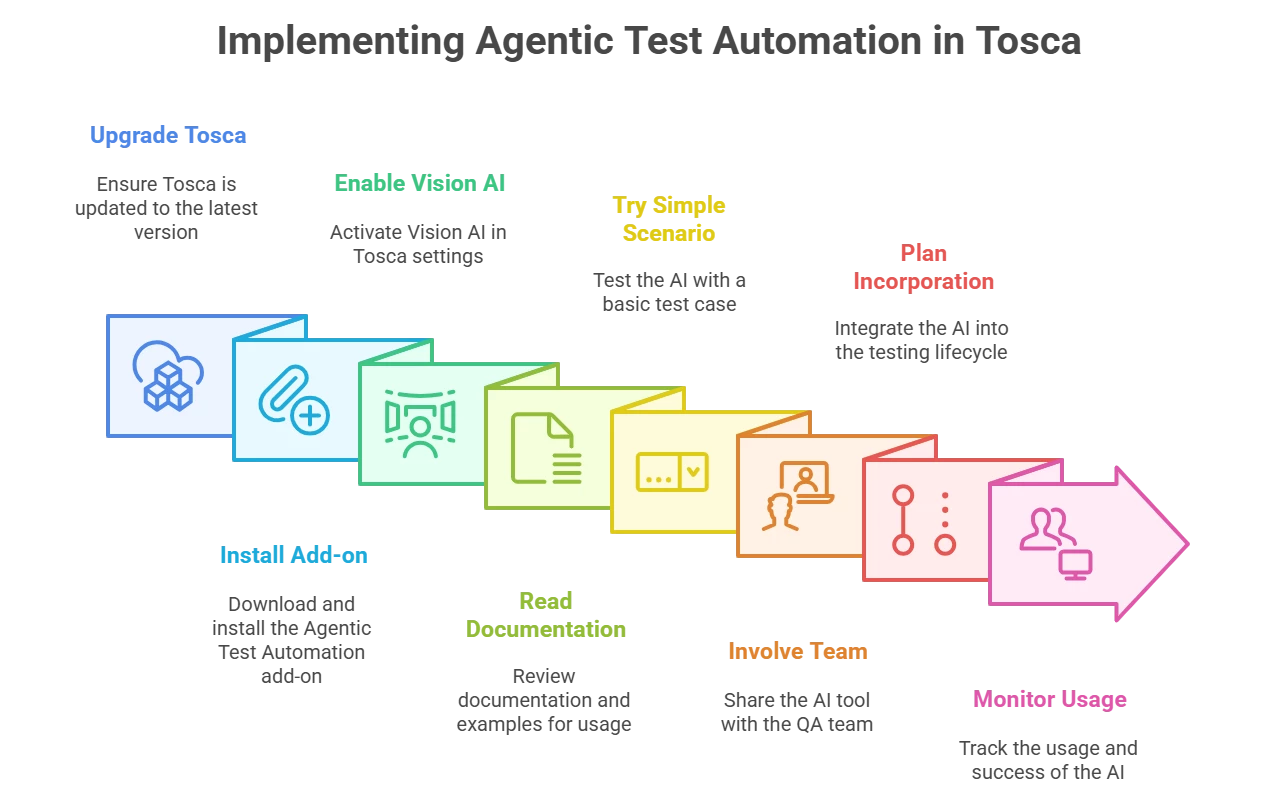
If you’re ready to try out agentic test automation in Tosca, here’s how to get started:
-
Upgrade Tosca: Make sure your Tricentis Tosca installation is up to date (2024+). The feature was introduced in Tosca 16.x (2024.1). It will not work on older versions, so plan an upgrade if you’re on 2023 or earlier. The latest patches also contain fixes that improve Vision AI and agent stability, so being current is important.
-
Install the Agentic Automation Add-on: Visit the Tricentis Support Portal (Support Hub) and download the Tricentis Tosca Agentic Test Automation add-on (the version noted in the webinar was 1.4.4 as the latest). This comes as a small extension that you install on top of Tosca Commander. Follow the installation instructions provided by Tricentis (typically it’s an MSI for Windows). Once installed, you should see new options in Tosca for the AI assistant.
-
Enable Vision AI: During Tosca installation, Vision AI (the AI Engine) is usually included but may require activation. Ensure that Vision AI is enabled in your workspace settings. You might need to enter your Tricentis credentials in Tosca to connect to the Vision AI service. In Tosca 2024, Vision AI uses a cloud service which is tied to your Tosca tenant account (so if you don’t have a Tricentis account, create one and have your Tosca licenses associated with it). When you first trigger the agent, Tosca will prompt for login – use your Tricentis ID (same as for Support Hub or Tricentis Academy). It will then auto-provision the Vision AI service for your tenant (no separate license needed if you’re within the free prompt limits). This is usually a one-time setup per machine or user.
-
Read the Documentation and Examples: Tricentis provides documentation for Agentic Test Automation, including example prompts and usage guidelines. In the agent interface, there are links to these examples – for SAP, for generic web, etc.. It’s a good idea to skim through the official docs to see sample test descriptions and any known limitations. The docs also cover things like attaching files, supported formats, and troubleshooting common issues (for instance, if Vision AI cannot find a control, what to do). Since the technology is new, these resources are valuable for learning how to phrase prompts or handle special cases.
-
Try a Simple Scenario: Start with a simple test case on a non-critical application to get a feel for it. Perhaps use a demo web app or a test environment of your AUT. Write a short scenario (login and navigate to a page, or create a simple record) and see how the AI performs. Experiment with both Autonomous and Co-Create modes. This will build your confidence in the AI’s behavior. Keep an eye on the Step Designer to understand how it interprets your instructions.
-
Involve the Team: Show your QA team members how it works. It’s the kind of feature that has a “wow” factor when first seen. Once people see tests being generated from text, they often come up with many ideas on how to use it. Encourage your team to come up with scenarios to try. Maybe have a “Lunch and Learn” where you live-demo generating a test with input from the audience. Getting team buy-in will help integrate the AI agent into your normal test design process, rather than it being a one-person gadget.
-
Plan for Incorporation: Think about where in your testing lifecycle this fits. Some potential integration points:
-
When new user stories are ready for testing, use the agent to quickly create initial automated regression tests for them (even before manual testing is fully done – you can almost do automation first).
-
For existing manual test cases that haven’t been automated yet, feed them into the AI to accelerate your automation backlog conversion.
-
Use it during exploratory testing to document paths: as you explore an app manually, copy the steps into the agent and let it spit out an automated script of that exploration for later.
-
Spike solutions: If you’re not sure how to automate a tricky sequence (like a complex form), give the agent a shot – even if it doesn’t 100% succeed, it might generate a workable approach that you can refine.
Also decide on how you’ll manage reviewing AI-created tests. Perhaps set a rule that all AI-generated tests are peer-reviewed by another team member (just as you might do code reviews). This ensures quality and shared knowledge of the new tests.
-
-
Monitor Usage: Keep track of how often and how successfully you use the free prompts. If you find it becomes an indispensable part of your workflow, you might want to budget for the feature when the free tier is exceeded. Tricentis has not finalized pricing at the time of the webinar, but they indicated the intent is to give a generous free tier precisely to encourage usage. In any case, monitoring will tell you the ROI – e.g., “This month the AI generated 20 test cases that would have taken 100 hours of manual work.” Those kind of metrics will help justify continued investment in AI-led testing.
By following these steps, you can smoothly introduce agentic automation into your QA practice. The key is to start small, learn how to best communicate with the AI, and then scale up your usage as you gain confidence.
Future Outlook: Agentic Testing and Beyond
Tricentis Agentic Test Automation marks the beginning of a new era in test automation, but it’s by no means the end goal. It’s the first step towards autonomous testing workflows that incorporate multiple AI agents and cover various facets of quality engineering. Here are some developments on the horizon:
-
Broader Technology Support: As discussed, the initial GA (General Availability) release focuses on web applications (SAP Fiori specifically) using Vision AI. Very shortly, Tricentis will extend support to SAP GUI (the classic SAP client) and HTML web applications via direct TBox engine integration. Support for Java and .NET desktop applications is also planned, as well as other UI frameworks. Essentially, the roadmap is to cover all UI technologies that Tosca can traditionally automate, under the agentic umbrella. Oracle applications, for instance, would fall under either web (if Oracle Cloud apps) or desktop (if Oracle Forms), and Tricentis is evaluating those as well. Salesforce was explicitly mentioned – it’s a web app, so the HTML engine support will handle it. These expansions mean that by later 2025, you can likely use agentic automation on anything from a legacy VB app to a cutting-edge cloud app. The AI’s ability to adapt to the tech stack will increase as it gains hooks into these engines. For now, if you try the agent on an unsupported tech, it may or may not work (generic Vision AI might handle some, but with less accuracy). Tricentis clearly labels the currently supported vs. beta vs. future tech in documentation. For example, at launch, SAP Fiori is fully supported (production-ready), whereas generic web is beta (useful, but not guaranteed stable yet). By GA of each engine, the AI’s accuracy and reliability for that engine should be on par with what we saw for Fiori in the demo.
-
AI-Augmented Test Maintenance: A current limitation is that the agent primarily creates new tests and modules; it doesn’t yet go back and update existing tests when the application changes (aside from the self-healing that Vision AI inherently provides on minor UI shifts). Tricentis is actively working on giving the AI the capability to maintain and refactor tests. This could mean an AI agent that, when pointed at a failing test, figures out how to fix it (perhaps the application changed a button label, so the module’s recognition needs an update) – the AI could propose the fix or auto-implement it. The roadmap explicitly lists “ability to maintain those modules” after the reuse functionality. Imagine an agentic “maintenance mode” where you feed in a test log or updated manual steps, and it adjusts the automated test accordingly. This would be huge for reducing the often tedious maintenance phase of test automation, keeping scripts evergreen despite application evolution.
-
Integration with Test Management (qTest) and Requirements: We might see the AI tie directly into test management systems. For example, Tricentis qTest could have a button “Generate Automation” for a given manual test case – clicking it could invoke the agent to create an automated version in Tosca. In the webinar, they mentioned a vision of feeding Jira tickets or requirements to an agent that first generates manual test cases and then passes them to the automation agent. This implies a chain where, say, a “Test Design Agent” reads a user story and outputs a test scenario, which then the “Test Automation Agent” (Tosca’s agent) turns into automation. Early steps in this direction can be seen with the AI workflow beta, which is “persona-aware” – meaning it can adapt if you’re a developer, tester, etc., and produce output accordingly. The pieces are there: Tricentis already introduced requirements-to-test-case AI suggestions (in earlier demos of Copilot) and now the test-case-to-automation. It’s logical they will streamline it so that, for instance, as soon as a new requirement is marked ready, an AI could propose tests and even have an automated script stub ready, reducing the time from requirement to automated test dramatically.
-
Performance and Load Testing Agents: Tricentis mentioned expanding agentic capabilities into performance testing (NeoLoad). We could envision an AI where you say “simulate 100 users logging in and doing X transaction” and it generates a NeoLoad scenario for you. Or it could analyze application performance results and pinpoint bottlenecks. The press release hinted at “an AI agent capable of generating complete test cases… analyzing prior test runs… adapting to context”. The analyzing prior runs part suggests an AI that doesn’t just generate blindly but learns from test history (perhaps optimizing what areas to focus on or adjusting test data based on past failures). For functional tests, this could mean if a test failed before due to a certain condition, the AI might automatically include a check or different path next time. For performance, it could optimize user load patterns based on past metrics.
-
Quality Analytics and Risk-Based Testing: With integration of SeaLights (Tricentis’s analytics for code coverage and risk), an AI agent could advise on where testing is lacking. For example, SeaLights might identify that certain new code was not tested by any existing cases; an AI could then generate tests to cover that gap. In the webinar conclusion, Adnan mentioned expanding agentic automation to “test planning phase” and “quality intelligence” (SeaLights). So the AI might become an assistant during sprint planning, suggesting which tests to create or run based on risk. This aligns with the concept of continuous automated test optimization.
-
Multiple Agents Collaboration: The endgame is a fleet of specialized AI agents working collaboratively. Tricentis CEO Kevin Thompson emphasized a “hybrid model” where AI doesn’t just assist but acts to drive productivity alongside humans. Tricentis doesn’t claim AI will replace testers; rather, it will take over the repetitive labor and amplify the reach of testers. Over the next couple of years, we can expect announcements of new “agentic” features across the Tricentis platform. Each will likely tackle a different slice of the testing life cycle, but all will be connected (through MCP servers and integrated UIs) to provide a seamless experience. Tricentis’s strategy is notably not one-size-fits-all; they want to allow customers to plug in their own AI or use Tricentis’s, and enable incremental adoption. So you might start with just the Tosca automation agent, then add on an AI workflow for test management, etc., gradually moving towards a more AI-driven process at a comfortable pace.
What does this mean for QA engineers? It means your role is evolving into more of a QA strategist and orchestrator of AI assistants. Instead of manually crafting every test step, you’ll be overseeing AI outputs, setting testing objectives, and handling the creative and complex aspects of quality assurance. Testers will always be needed to determine what to test, to define the acceptance criteria, and to interpret results. The AI will increasingly handle the how of test implementation and even initial analysis. This agentic approach promises to greatly speed up testing, reduce costs, and arguably make testing more enjoyable by eliminating boring tasks. But it also means testers should become comfortable working with AI tools, verifying AI decisions, and guiding AI when it’s uncertain. It’s a new skill set – call it “AI-augmented testing” – that forward-thinking QA professionals will embrace.
Tricentis is at the forefront of this trend. By embedding AI deeply into Tosca and offering it across their product suite, they are leading a wave of transformation in the industry. As one industry observer noted, “These innovations mark the beginning of a broader roadmap to bring agentic AI into every corner of the software quality lifecycle.”. In other words, the future of testing is one where AI doesn’t just assist, it acts – handling entire tasks autonomously when possible. Agentic Test Automation is a prime example: the AI agent can independently generate and execute a test case from a simple description. It’s a taste of what’s to come, where many testing activities could be initiated with a prompt or even done proactively by AI agents monitoring the project.
Conclusion and Next Steps
Agentic Test Automation with Tricentis Tosca represents a significant leap in test automation productivity. By allowing QA engineers to partner with an AI agent, it accelerates test creation while maintaining human oversight and expertise. The AI becomes a capable junior tester that works at lightning speed, leaving the human tester to be the lead, verifying and fine-tuning the outcomes. This synergy can help teams keep up with rapid development cycles, increase automation coverage, and ultimately deliver higher-quality software with less toil.
As we’ve explored, getting started is accessible – if you have Tosca, you can experiment with the built-in free prompts and see immediate benefits. The feature is technical (underpinned by advanced AI), but Tricentis has managed to present it in a tester-friendly way: via simple natural language and intuitive UI controls. This means it’s not just a tool for AI specialists or automation engineers – it’s for every tester willing to leverage it. Whether you’re writing your first automated test or managing an extensive regression suite, agentic automation can slot into your activities and give you a turbo boost.
The broader trend is clear: AI-driven testing is here to stay, and Tricentis is spearheading it in a practical, enterprise-ready manner. Competing solutions in the market are also exploring AI, but Tricentis’s deep integration of AI into Tosca (with an emphasis on domain knowledge and flexibility) sets it apart. By not relying on a black-box third-party AI and instead crafting their own agentic framework, they ensure the solution is tailored for testers’ needs and can evolve with customer feedback. And by providing open interfaces (MCP) and multi-skill AI workflows, they future-proof it against the fast-changing AI landscape.
For QA organizations and professionals, now is an excellent time to start embracing these AI capabilities. There may be a learning curve, but the payoff in efficiency and enhanced capabilities is immense. It’s akin to when test automation itself was introduced – those who learned it gained a competitive edge. Today, AI-augmented testing is that next frontier. Early adopters will help shape the best practices and can reap the benefits of faster delivery and more robust testing.
Finally, if you want to see Agentic Test Automation in action and learn directly from the Tricentis experts behind it, be sure to check out the on-demand webinar “Tricentis Expert Session: Introducing agentic test automation with Tricentis Tosca”. In that session, you’ll find a live demo (like the one summarized here), audience Q&A with the product team, and additional insights into how this innovation came to be and where it’s headed. You can access the webinar through Tricentis Academy: Tricentis expert session: Introducing agentic test automation with Tricentis Tosca. It’s an invaluable resource to deepen your understanding and get inspired for implementing these ideas in your own testing projects. Happy testing – and happy prompting – with your new AI co-worker!

