


The Challenge of Frequent Oracle Updates
Oracle ERP systems – whether on-premises E-Business Suite (EBS) or cloud-based Fusion Applications – receive frequent updates (Oracle Fusion, for example, ships new features quarterly). For QA engineers, each update can mean an overwhelming regression test cycle to ensure nothing breaks. Testing everything is slow and resource-intensive, but testing only a guesswork subset risks missing critical bugs. How can teams speed up testing without sacrificing reliability? This is where AI-driven change impact analysis and intelligent test selection come in.
AI to the Rescue: Change Impact Analysis for Smarter Testing
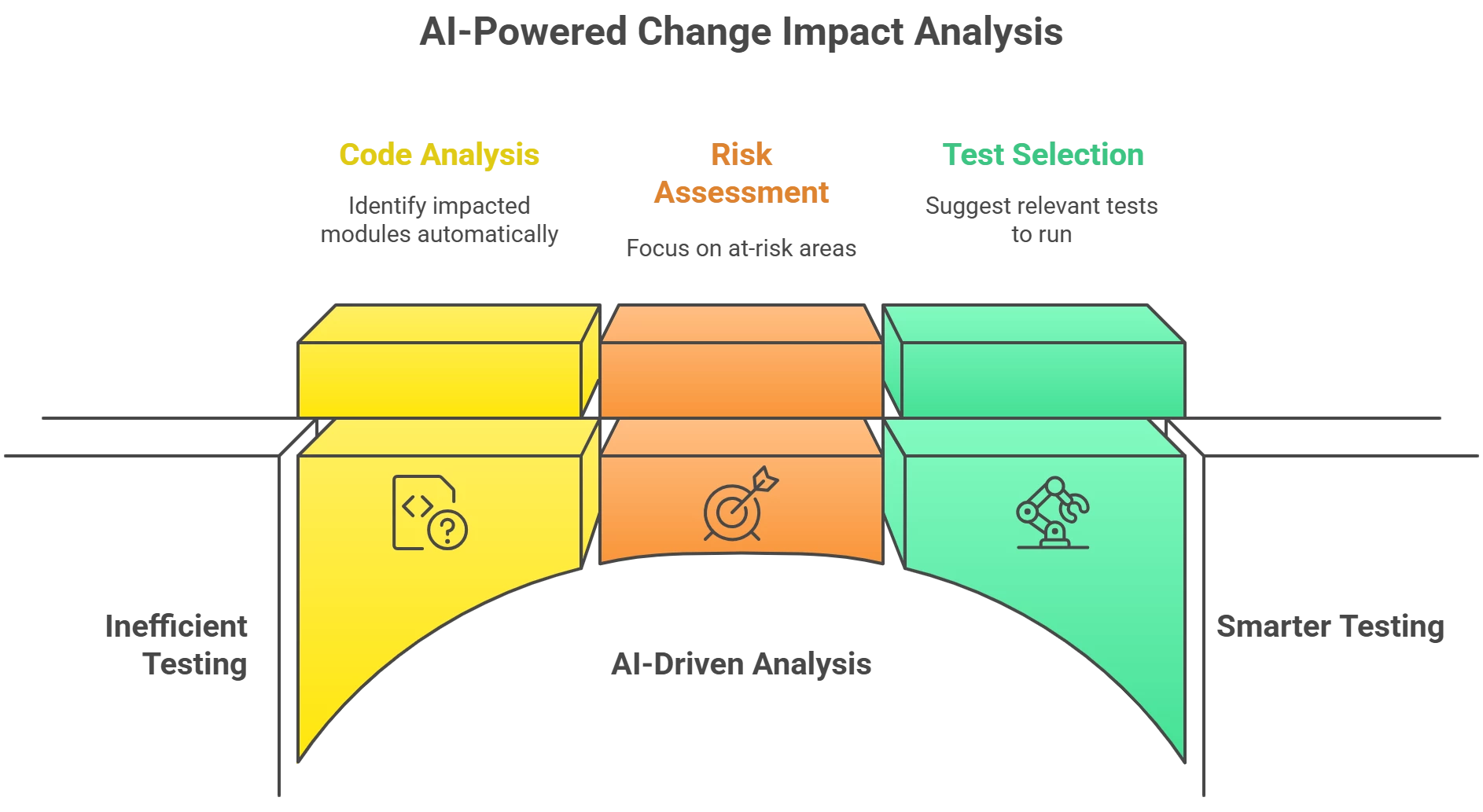
Change impact analysis uses AI and analytics to pinpoint what parts of the system are affected by a change, and thus what needs testing. Instead of relying on intuition, the AI combs through code changes, configurations, and even usage logs to identify impacted modules and business processes. This lets QA focus on the at-risk areas and skip tests unrelated to the change. In the SAP world, for example, Tricentis LiveCompare automatically selects only the tests covering the “most at-risk objects” and even finds tests tied to specific data changes in an update. The same principle now applies to Oracle apps: AI-driven tools (such as Panaya or Opkey) detect changes to your Oracle ERP and suggest exactly which tests to run. In practice, this risk-based testing means you’re executing a leaner test suite that still covers all critical functionalities. In fact, QA teams using such approaches have reported drastic reductions in test scope and duration – Panaya claims that eliminating unnecessary tests can shrink test cycles by up to 85% while maintaining quality coverage. By removing the guesswork, you get faster feedback on each Oracle update without compromising on thoroughness.
Step-by-Step Workflow: AI-Guided Test Selection in Oracle QA
Implementing AI-powered impact analysis in your Oracle testing workflow is straightforward and highly practical. Here’s a step-by-step guide:
-
Identify Changes: First, gather what’s changing in the upcoming Oracle update or patch. An AI tool can automatically compare the new release (“to-be”) with your current system (“as-is”) to highlight modified modules, configurations, or even UI elements. This establishes a clear list of impacted components.
-
Assess Impacted Processes: Next, let the AI analyze which business processes or transactions touch those changed components. Modern ERP testing platforms use machine learning and process mining to map code/config changes to business workflows. This reveals which end-to-end processes (order-to-cash, hire-to-pay, etc.) might be affected by the update. For example, if a quarterly Oracle Fusion update changes the purchase order module, the AI might flag the Procure-to-Pay workflow as impacted.
-
Map to Test Cases: With the affected areas identified, the AI engine will cross-reference your test repository to find existing test cases covering those areas. It surfaces the regression tests (manual or automated) that align with the changed functionality. Just as LiveCompare audits test repositories for matching cases, Oracle-focused tools do the same for your Oracle Financials, Supply Chain, HR, etc. If gaps exist (i.e. some impacted scenarios have no current tests), the tool will highlight them so you can create new test cases before the release.
-
Prioritize Based on Risk: Not all changes are equal – some are trivial, others strike at mission-critical processes. AI impact analysis helps rank the risk. High-impact changes (say, a change in revenue recognition logic) should have top priority in testing. Lower-risk changes (e.g. a minor UI label tweak) might be flagged as low priority. This risk-based prioritization ensures testing effort is spent where it matters most, improving your odds of catching serious defects early.
-
Execute Targeted Tests: Now run the selected priority tests. Because the selection is laser-focused, the number of test cases is dramatically reduced compared to a full regression suite – saving time and resources. Many teams integrate this step into CI/CD pipelines for Oracle updates, so that as soon as an update is applied in a QA environment, the AI-recommended tests execute automatically. If you have test automation in place for Oracle (e.g. using Selenium, Tricentis Tosca, etc.), those scripts can be triggered for the specific scenarios the AI identified. This approach has been shown to shrink test cycle time significantly without missing critical coverage.
-
Analyze Results & Expand if Needed: Finally, review the test results. If all targeted tests pass, you gain confidence that the update didn’t break key processes. If some tests fail or show anomalies, you’ve pinpointed a problem area to fix before production. At this stage, you might run additional exploratory tests around the failed area, but you’ve already covered the most likely failure points. The AI can also learn from these results – many platforms will refine their recommendations over time based on which changes did or didn’t cause issues, continually improving the accuracy of impact predictions.
Throughout this workflow, communication is key. AI-driven reports often provide handy visuals and lists that you can share with stakeholders to explain what’s being tested and why. This transparency helps keep business owners and developers aligned, since everyone sees which critical business functions are protected by the targeted tests.
Key Takeaways for Oracle QA Teams
Embracing AI for change impact analysis can revolutionize how QA handles Oracle updates. You’ll test faster by running only the most relevant test cases and skipping redundant checks, and you’ll test more reliably by focusing on areas of true risk (ensuring vital processes are thoroughly validated). In practice, Oracle QA teams using intelligent test selection have reported 40–85% reductions in regression testing time while maintaining or even improving test coverage. The end result is a leaner, smarter testing cycle: when Oracle rolls out that next quarterly Fusion update or EBS patch, you can release it with confidence and minimal downtime. The tip for this week is to leverage AI change intelligence in your QA process – start small by using it on an upcoming update to identify at-risk areas, and experience how it streamlines your testing workload. By letting AI pinpoint “what to test,” your team can deliver higher-quality releases, faster – a win-win for both testing efficiency and software reliability in the Oracle ecosystem.