



Tip

AI Tip of the Week #8: Using AI to Tackle Flaky Automated Tests

  • September 25, 2025
  • 1 reply
  • 58 views
Mustafa
Forum|alt.badge.img+8

Flaky tests

Those that pass sometimes and fail other times with no code changes, are a recurring headache in test automation. They waste time, erode trust in the test suite, and slow down release cycles. The good news is that AI can help identify, diagnose, and reduce these pesky false failures. Below is a grounded, step-by-step workflow for QA teams to apply AI in real test environments to handle flaky tests. This isn’t theory, it’s a practical approach you can use regardless of which tools you have (though we’ll note a couple of examples like Tricentis where relevant).

Step-by-Step Workflow: Reducing Flaky Tests with AI
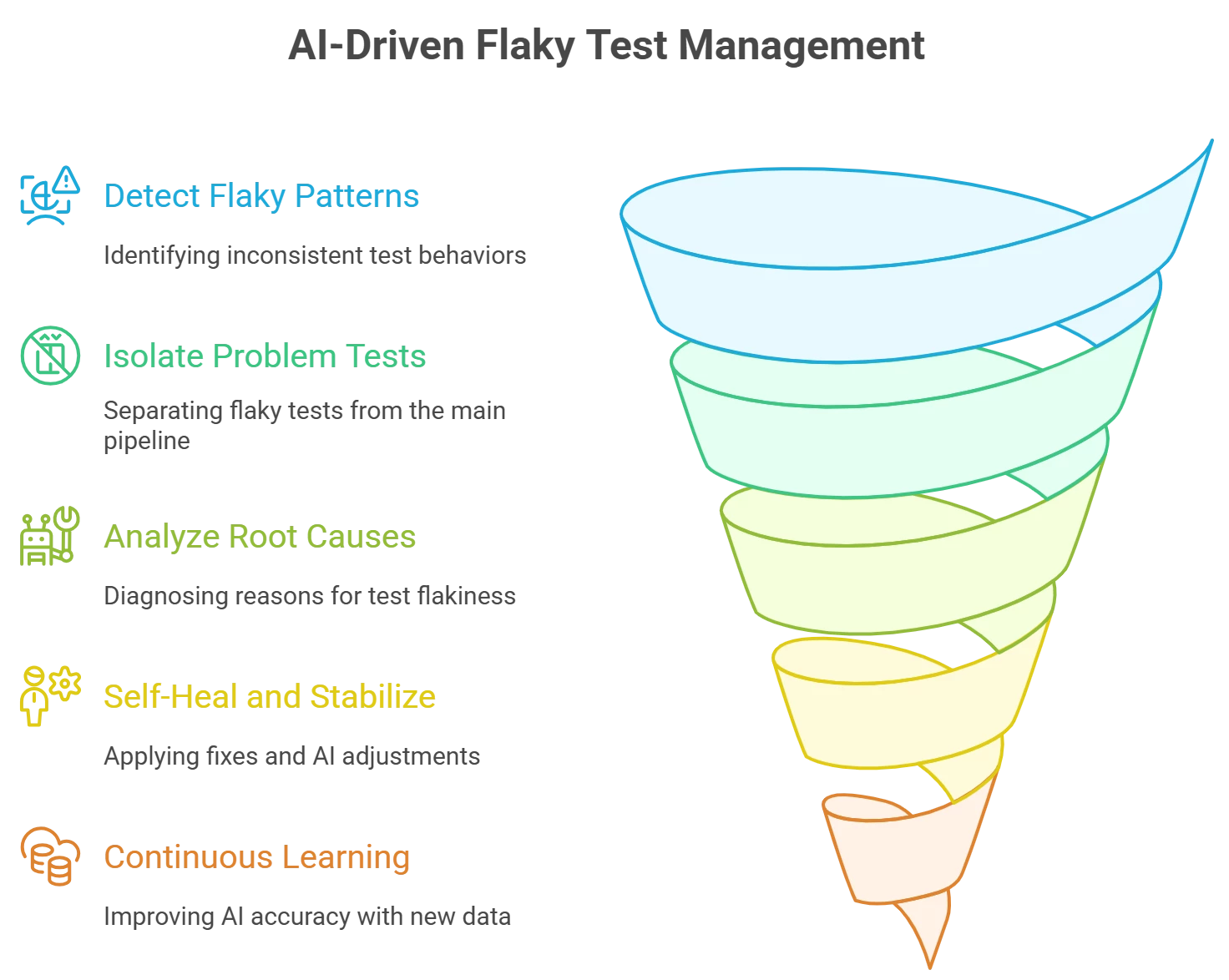
 

1. Detect Flaky Patterns with AI:

Start by aggregating your test results over time (from CI pipelines or test management). Use AI/ML analytics to spot patterns of inconsistency – for example, tests that often fail intermittently across runs. AI-powered tools can analyze past execution data (timestamps, environments, error logs) to flag tests that are non-deterministic. This saves you from manually crunching through logs and highlights flaky tests early.

2. Isolate and Prioritize Problem Tests:

Once identified, separate flaky tests from the main pipeline so they don’t block your development progress. AI tools can automatically suppress or quarantine unreliable tests during runs, ensuring that only real failures demand attention. This means your CI/CD pipeline can focus on legitimate bugs while flaky tests are routed to a different track for later analysis. By isolating flaky cases, teams maintain confidence in test results and can prioritize fixing tests that have the highest impact first.

3. AI-Driven Root Cause Analysis:

Next, leverage AI to diagnose why those tests are flaky. Advanced test analytics platforms can parse execution logs and environment data to find common factors in failures. For example, an AI-based tool might recognize that a test usually fails only on a specific browser or when memory usage is high – clues a human might miss. This pattern recognition pinpoints if the flakiness stems from timing issues, concurrency problems, environment configuration, or external dependencies. With these insights, you can take targeted action (e.g. increase a timeout, stabilize the test environment, or fix a race condition).

4. Self-Heal and Stabilize Tests:

With root causes in mind, apply fixes and let AI help make them stick. Modern AI-driven testing tools offer self-healing capabilities that automatically adjust tests when applications change. For instance, if a UI element’s locator changed and caused failures, an AI can update the script’s selector on the fly. This reduces maintenance effort and eliminates many flaky failures due to minor UI updates. Similarly, AI-based “smart wait” mechanisms can dynamically adjust synchronization to handle timing issues. Many automation frameworks have these features built-in (for example, Tricentis Tosca’s Vision AI and Tricentis Testim use AI to auto-improve locators and stabilize scripts). By letting AI self-heal brittle tests, you minimize false failures and keep the suite running green with less manual intervention.

5. Continuous Learning and Prevention:

Finally, make AI-driven flakiness prevention part of your ongoing process. Continuously feed new test run data back into your AI analysis to improve its accuracy in predicting flaky behavior. Some tools provide predictive analytics that warn you of likely flaky scenarios (e.g. a test that tends to fail Friday nights or under specific load conditions) so you can preemptively address them. Monitor flaky tests after fixes – if they stabilize, gradually fold them back into the main test suite. Over time, an AI-enhanced system will not only catch flakes faster but also help you design more robust tests from the start (by learning from historical patterns of flakiness and suggesting best practices).

Wrapping up

By integrating AI at each stage (detection, diagnosis, and maintenance) you can turn flaky tests from a weekly nuisance into a manageable part of your QA workflow. Teams report more reliable test suites, faster feedback, and fewer “false alarm” failures when using AI-driven testing practices. The beauty of this approach is that it’s tool-agnostic: whether you use a commercial solution (many modern QA platforms, including Tricentis, already embed these AI capabilities) or open-source libraries, the workflow remains the same. Embrace AI for your flaky tests, and you’ll spend less time fighting test script issues and more time delivering quality software. Happy testing!

1 reply

Ramanan
Forum|alt.badge.img+6
  • Ace Pilot
  • September 26, 2025

Flaky tests

Those that pass sometimes and fail other times with no code changes, are a recurring headache in test automation. They waste time, erode trust in the test suite, and slow down release cycles. The good news is that AI can help identify, diagnose, and reduce these pesky false failures. Below is a grounded, step-by-step workflow for QA teams to apply AI in real test environments to handle flaky tests. This isn’t theory, it’s a practical approach you can use regardless of which tools you have (though we’ll note a couple of examples like Tricentis where relevant).

Step-by-Step Workflow: Reducing Flaky Tests with AI


1. Detect Flaky Patterns with AI:

Start by aggregating your test results over time (from CI pipelines or test management). Use AI/ML analytics to spot patterns of inconsistency – for example, tests that often fail intermittently across runs. AI-powered tools can analyze past execution data (timestamps, environments, error logs) to flag tests that are non-deterministic. This saves you from manually crunching through logs and highlights flaky tests early.

2. Isolate and Prioritize Problem Tests:

Once identified, separate flaky tests from the main pipeline so they don’t block your development progress. AI tools can automatically suppress or quarantine unreliable tests during runs, ensuring that only real failures demand attention. This means your CI/CD pipeline can focus on legitimate bugs while flaky tests are routed to a different track for later analysis. By isolating flaky cases, teams maintain confidence in test results and can prioritize fixing tests that have the highest impact first.

3. AI-Driven Root Cause Analysis:

Next, leverage AI to diagnose why those tests are flaky. Advanced test analytics platforms can parse execution logs and environment data to find common factors in failures. For example, an AI-based tool might recognize that a test usually fails only on a specific browser or when memory usage is high – clues a human might miss. This pattern recognition pinpoints if the flakiness stems from timing issues, concurrency problems, environment configuration, or external dependencies. With these insights, you can take targeted action (e.g. increase a timeout, stabilize the test environment, or fix a race condition).

4. Self-Heal and Stabilize Tests:

With root causes in mind, apply fixes and let AI help make them stick. Modern AI-driven testing tools offer self-healing capabilities that automatically adjust tests when applications change. For instance, if a UI element’s locator changed and caused failures, an AI can update the script’s selector on the fly. This reduces maintenance effort and eliminates many flaky failures due to minor UI updates. Similarly, AI-based “smart wait” mechanisms can dynamically adjust synchronization to handle timing issues. Many automation frameworks have these features built-in (for example, Tricentis Tosca’s Vision AI and Tricentis Testim use AI to auto-improve locators and stabilize scripts). By letting AI self-heal brittle tests, you minimize false failures and keep the suite running green with less manual intervention.

5. Continuous Learning and Prevention:

Finally, make AI-driven flakiness prevention part of your ongoing process. Continuously feed new test run data back into your AI analysis to improve its accuracy in predicting flaky behavior. Some tools provide predictive analytics that warn you of likely flaky scenarios (e.g. a test that tends to fail Friday nights or under specific load conditions) so you can preemptively address them. Monitor flaky tests after fixes – if they stabilize, gradually fold them back into the main test suite. Over time, an AI-enhanced system will not only catch flakes faster but also help you design more robust tests from the start (by learning from historical patterns of flakiness and suggesting best practices).

Wrapping up

By integrating AI at each stage (detection, diagnosis, and maintenance) you can turn flaky tests from a weekly nuisance into a manageable part of your QA workflow. Teams report more reliable test suites, faster feedback, and fewer “false alarm” failures when using AI-driven testing practices. The beauty of this approach is that it’s tool-agnostic: whether you use a commercial solution (many modern QA platforms, including Tricentis, already embed these AI capabilities) or open-source libraries, the workflow remains the same. Embrace AI for your flaky tests, and you’ll spend less time fighting test script issues and more time delivering quality software. Happy testing!

​@Mustafa ,

Flaky tests really are the silent killers of trust in automation 😅. Love how this breaks down a practical workflow instead of just theory. The AI-driven root cause analysis + self-healing approach feels like a game changer especially the part about smart waits and pattern recognition. Curious to hear from others: have you tried AI-powered tools for flakiness yet, or are you still tackling them manually?