



QA teams often focus on predefined test cases and code coverage, but real user behavior in production can reveal gaps in your testing. By leveraging AI to analyze production logs, clickstreams, and session data, you can identify which user journeys or edge cases aren’t covered by your QA tests. This ensures your test suite mirrors how people actually use the product, catching issues that slip past traditional test design.
Why Look at Production User Behavior?
In production, users may take paths and encounter scenarios that QA never anticipated. Analyzing this real-world usage uncovers high-traffic features and unusual workflows. These insights help pinpoint “blind spots” in your current test coverage – areas of the application that users engage with frequently or in unexpected ways, but which your tests don’t exercise. AI tools excel at sifting through large volumes of user interaction data (logs, analytics) to spot patterns and outliers that manual analysis might miss. This means common workflows and rare edge-case sequences can be identified automatically, highlighting where your test suite might be lacking.
AI-driven analysis also prioritizes what matters most. By examining usage patterns and business impact, AI can determine which parts of the application are most defect-prone or critical to users. For example, if a particular feature is heavily used in production but lightly tested, that’s a risk area. Likewise, an infrequently used sequence that causes errors in logs might indicate an edge case worth adding to your tests. In short, production analytics + AI = a roadmap for smarter testing coverage.
How AI Helps Uncover Test Gaps
Manually combing through thousands of log lines or user sessions is impractical. This is where AI shines. Machine learning models can parse clickstream and telemetry data to cluster typical user journeys and flag anomalies. They identify the most common user flows (which should definitely be covered by tests) and rare flows that still occur (potential edge cases). AI can even correlate these patterns with defect data – for instance, finding that certain user actions precede errors – to suggest where additional testing is needed.
Notably, modern AI-driven testing tools can go a step further by using real user data to generate test scenarios automatically. As one guide explains, feeding your AI models with actual user behavior data (from logs, analytics, heatmaps) helps generate meaningful test paths and catch edge cases your team hadn’t thought of. In other words, the AI learns from how your customers use the app and suggests or creates tests to cover those behaviors. This bridges the gap between laboratory testing and real-world usage, making your QA coverage more robust.
Step-by-Step Workflow for Using AI on Production Data
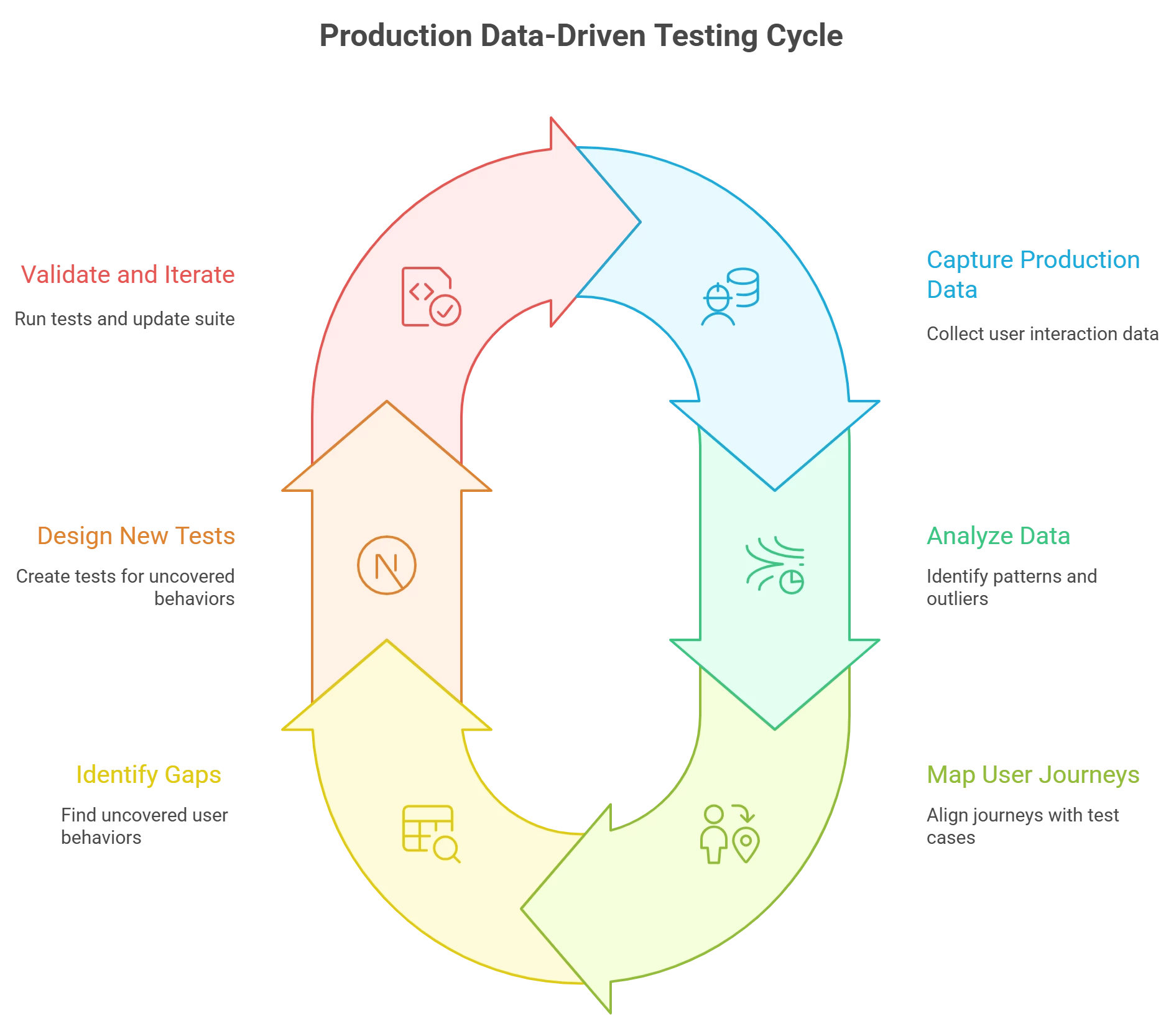
QA teams can follow these practical steps to apply AI-driven analysis of production behavior and close test gaps:
-
Capture Production Usage Data: First, gather data on how users interact with your application in production. This can include web analytics, user session recordings, server logs, clickstream data, and error logs. Ensure you have proper monitoring or logging in place (e.g. event logs, user journey tracking) and respect privacy regulations when collecting user data. The goal is to obtain a rich dataset of real user flows and actions over a period of time.
-
Analyze for Patterns and Outliers: Next, feed this data into an AI or data analytics tool. Use machine learning algorithms to identify common user flows and frequent sequences. At the same time, detect outlier behaviors – unusual sequences or edge cases that occur occasionally. AI can quickly surface the top N user journeys (e.g. the most common navigation paths through your app) and highlight rare but significant events (e.g. a sequence of actions that led to a crash). This automated mining of production data reveals what users actually do. Tip: Visualization tools or clustering algorithms can help map out user navigation paths for easy comparison with test cases.
-
Map User Journeys to Test Cases: With a list of common and critical user journeys from production, compare them against your existing test suite. This might involve exporting your test cases (from a test management tool or spreadsheets) and tagging each with the user flows it covers. You can do this mapping manually or with the help of an AI assistant that reads test case descriptions and matches them to user scenarios. The objective is to see which production scenarios already have tests, and which do not. If you have a requirements-to-test traceability matrix or use BDD scenarios, leverage those to connect real usage to test coverage.
-
Identify the Gaps: Now, pinpoint the test coverage gaps. These are the user behaviors that happen in production but aren’t covered in QA. For example, you might find that users often use a combination of filters in a search feature that none of your test cases currently simulate. Or perhaps users on mobile devices follow a navigation path that wasn’t in the original requirements, thus not tested. List these gap areas, and assess their impact: How frequently is the scenario occurring? How critical is the functionality to the business or user satisfaction? Prioritize gaps that involve high-traffic features or critical user actions (especially those prone to defects). This priority list will guide where to focus new tests first.
-
Design or Generate New Tests: For each high-priority gap identified, create new test cases to cover it. This can be done manually by writing test scenarios that mirror the production behavior, or you can employ AI here as well. Some advanced tools can generate test cases automatically from user data, translating clickstream patterns into automated test scripts. In any case, ensure the new tests reflect the real user steps (including data variations or environment conditions observed in production). AI assistance can speed this up – for instance, it might suggest a sequence of actions for a test based on common user behavior, helping you catch those “you never saw coming” issues. Incorporate these tests into your regression suite or continuous testing pipeline.
-
Validate and Iterate: Run the new tests and see if they catch any bugs or fail where expected. This not only validates that the previously untested scenario is now under coverage, but it may also reveal underlying defects to fix. Monitor the results over a few cycles. Going forward, make this analysis a recurring practice – for example, after each major release or on a regular cadence, re-analyze fresh production data with AI to spot emerging usage trends. As your application evolves and users find new ways to use it, continuously update your test suite accordingly. This feedback loop ensures your QA stays aligned with real-world use.
Real-World QA Benefits
By integrating production behavior analysis into testing, QA teams become more proactive and customer-centric. You’ll catch issues before they become widespread bugs in the wild, because your tests won’t just cover what the developers think users will do – they’ll cover what users actually do. Teams that have adopted this approach report stronger confidence in release quality and fewer hotfixes, since test coverage now targets high-risk, high-usage areas of the application. AI’s ability to crunch through user data at scale makes this feasible without huge manual effort. It’s a practical way to let the voice of the customer (in the form of their usage data) directly influence your quality processes.
In summary
Mining production logs and clickstreams with AI can spot test coverage blind spots that traditional planning might miss. It bridges the gap between testing and reality. By following the above workflow, your QA team can ensure that every popular user journey and critical edge case is backed by a reliable test. This means fewer surprises in production and a smoother experience for users – which is the ultimate goal of quality assurance. Embrace these AI-driven insights, and watch your test suite evolve in step with your users.

