

Driving Quality Intelligence in SAP (ABAP) with Tricentis SeaLights: A Practical Guide
TL;DR
- Stop testing everything. Use change-based testing to focus on what actually changed in ABAP and what’s therefore at risk.
- Set up SeaLights for ABAP with three building blocks: ABAP Agent + WATCHER + SLABAPCLI, authenticated by a token.
- Create a Pipeline per SAP landscape slice (typically QAS + PRD), generate an Initial Build Map once, then run Build Modifications and Footprints on a schedule (commonly every 5 minutes).
- Connect Tosca so executions automatically send footprints to SeaLights—turning test runs into coverage intelligence and gap visibility.
Why “Quality Intelligence” matters in SAP ABAP
SAP landscapes are complex, and ABAP changes can ripple into business-critical processes. Traditional regression approaches often swing between two bad options: test too much (slow releases) or test too little (risk defects). SeaLights’ approach is to provide quality intelligence—visibility into what changed, what tests covered those changes, and where gaps remain—so you can make release decisions based on evidence, not intuition.
At a high level, the ABAP Agent continuously monitors changes and correlates them with executed tests so teams can identify untested ABAP components and prioritize testing where it matters most.
The moving parts (and what each one does):
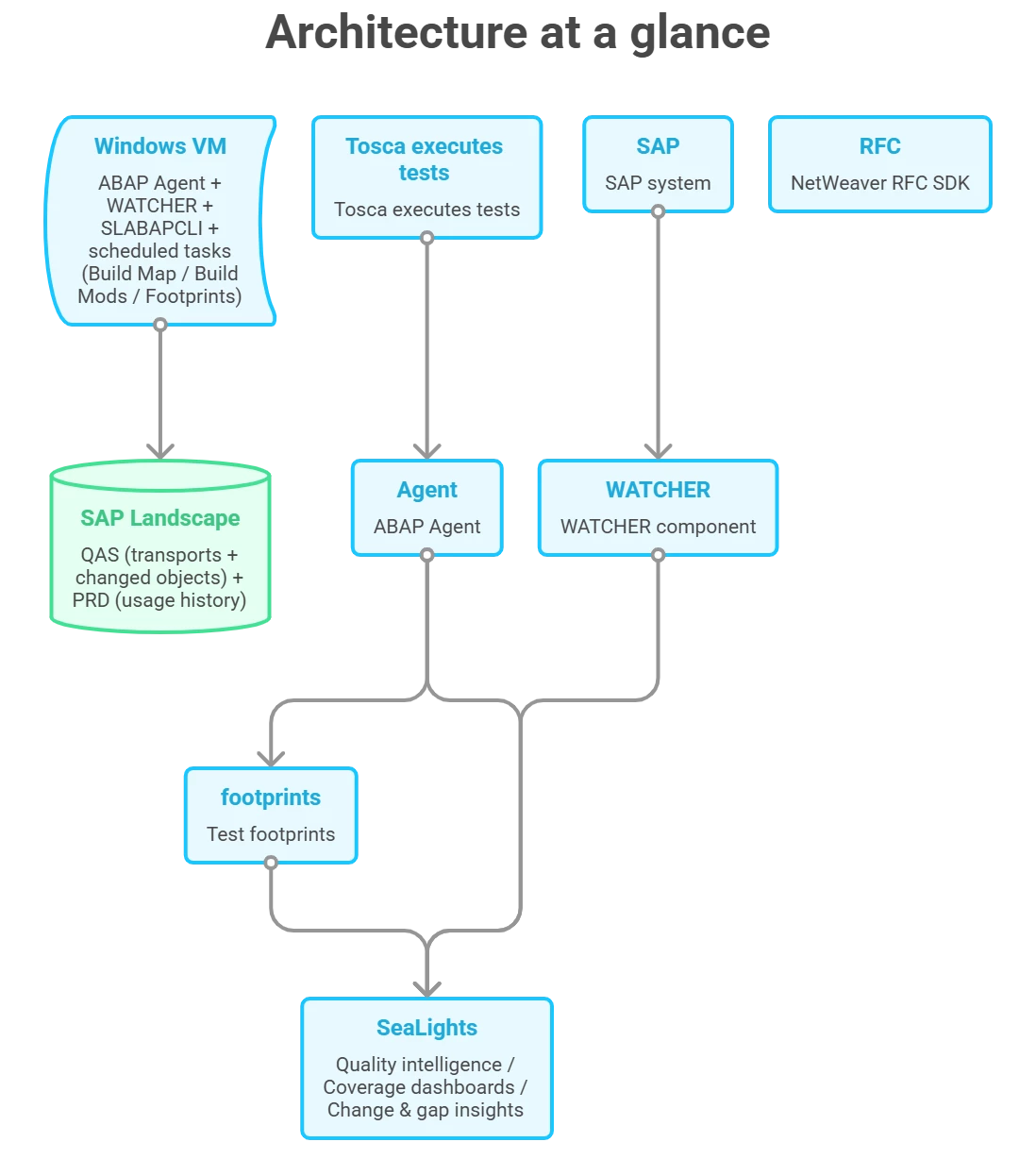
SeaLights for ABAP typically relies on these components:
- SLABAPCLI (Command Line Interface)
Used to install/configure the agent, set up RFC connections, define pipelines, and schedule jobs for build maps/mods/footprints. - WATCHER
A monitoring program that detects ABAP changes and reports them to SeaLights. - Config file (config.toml)
Generated during setup and stores key configuration, including RFC destinations and pipeline definitions. - SAP NetWeaver RFC SDK (Windows x64)
Required for RFC communication with SAP systems. SAP describes the RFC SDK as a C/C++ interface to connect to SAP systems and call ABAP functionality via RFC.
Setup flow: from “zero” to actionable insights
1) Put the agent binaries + token in one place
A common pattern is to extract the agent ZIP and move the core executables into a system-wide folder (e.g., C:\apps\SLABAPAgent\bin). From there, place the downloaded token file in the same agent directory so it’s easy to reference during CLI setup.
SeaLights’ own ABAP Agent guidance recommends installing to a system-wide accessible directory (not a restricted user profile path) to avoid silent failures when writing logs and configuration.
2) Add the required SAP NetWeaver RFC SDK DLLs
To enable RFC connectivity, you’ll copy the required RFC SDK libraries into the agent bin folder. SeaLights documentation explicitly calls out files such as icudt57.dll, icuin57.dll, icuuc57.dll, libsapucum.dll, and sapnwrfc.dll for Windows x64.
Reinforcement: SAP’s RFC SDK is the supported interface layer for RFC connectivity into SAP systems and is intended for high-performance RFC communication.
3) Run CLI installation to generate local secrets + config.toml
Running the CLI setup install creates machine-local encryption keys and generates a default config.toml. This protects sensitive settings like RFC usernames/passwords and the agent identity.
4) Connect the agent to SeaLights with a token
Use the CLI command to “set” SeaLights connectivity; the CLI prompts for the token (it won’t echo the pasted value for security). Then confirm using “list” and “test” commands to validate customer ID/token and network connectivity.
Tip: SeaLights docs recommend validating basic network reachability (TCP 443 and HTTPS) as an early prerequisite for troubleshooting.
5) Configure RFC destinations (how the agent talks to SAP)
Next you define RFC destinations so the agent can reach your SAP systems. You’ll provide typical SAP connection parameters such as host, system number, client, and language.
Reinforcement: SAP explains RFC destinations as the configuration that enables RFC-based communication between systems (commonly maintained in transaction SM59) and includes values such as target host/system number and logon details.
6) Create a Pipeline to represent your SAP landscape slice
A Pipeline ties together the SAP environments you care about (often a QAS system, and optionally PRD for usage history), letting SeaLights treat that slice as an “application context” for mapping changes and coverage.
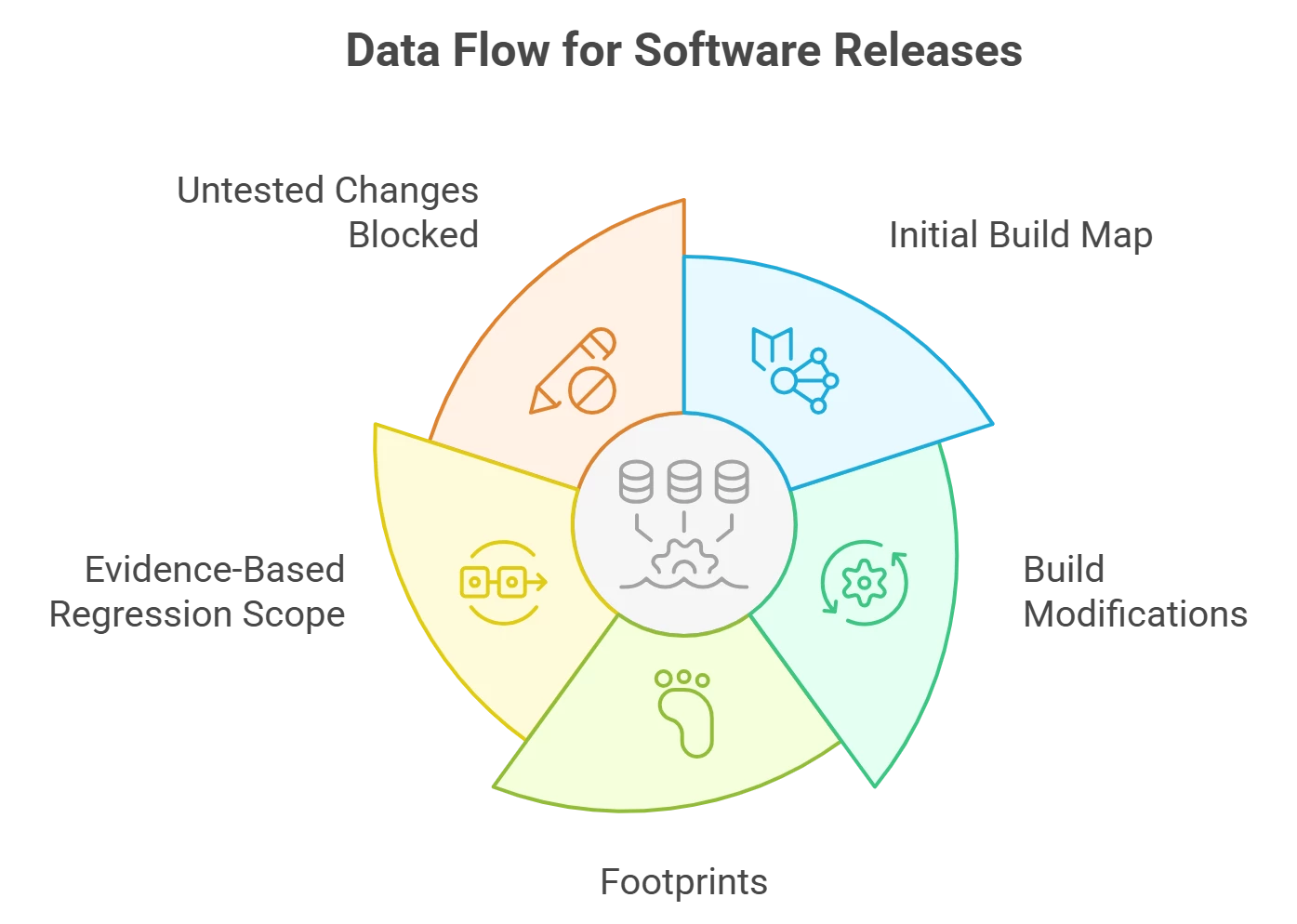
7) Generate the Initial Build Map (one-time baseline)
The Initial Build Map is the baseline inventory of ABAP objects for your pipeline. SeaLights documentation describes how the agent builds it using usage data (by default, the most recent 13 months) and then retrieves relevant objects from QAS packages/classes to send to SeaLights.
This job is typically scheduled to run once (you can see it created in Windows Task Scheduler).
8) Schedule Build Modifications (continuous deltas)
After the baseline, you want deltas—what changed since the last state. Build Modifications are typically scheduled to run on a frequent cadence (commonly every 5 minutes) to detect and report ABAP changes (often tied to transports into QAS) back to SeaLights.
9) Schedule Footprints (test-to-change correlation)
Footprints are how SeaLights learns what your tests exercised. When Tosca is connected, the agent can collect test execution details and match executed ABAP components against the latest build modifications, then send that to SeaLights as footprint data.
SeaLights explicitly notes that the footprints scheduled task runs every five minutes by default in the documented example.
Reinforcement: Windows Task Scheduler supports repeating task triggers (including short intervals), and PowerShell cmdlets like New-ScheduledTaskTrigger support repeated schedules through repetition settings.
Connecting Tosca: turning executions into coverage intelligence
Once the agent side is ready, connect Tosca to SeaLights using a token (via the project context menu). Then configure the execution list with key parameters:
- SeaLights Lab ID (found in SeaLights under test stages/cockpit views for your pipeline)
- CLite optimization = true (mandatory in the described setup)
- Optional: Test stage name to make reporting clearer across environments (local vs cloud vs CI stages).
Once connected, each execution can contribute footprints, and SeaLights can show coverage vs. changed ABAP objects, helping teams identify gaps quickly.
What you get at the end (the “quality intelligence” outcomes)
When the pipeline, build map/mods, and footprints are flowing, you unlock three core outcomes:
- Change visibility: what ABAP changed, continuously.
- Coverage mapping: which executed tests actually touched the changed ABAP objects.
- Gap detection: changed objects with no associated test coverage so you can prioritize new tests or refine scope.
This is the practical foundation of running change-based tests instead of broad, time-consuming regressions.
Troubleshooting checklist (fast signal, low noise)
If something doesn’t look right, these checks tend to pay off quickly:
- Connectivity: CLI “list”/“test” tells you whether the agent can reach SeaLights.
- RFC sanity: Validate RFC destinations and confirm QAS is reachable from the VM. SAP’s SM59 “Connection Test” concept is the standard validation pattern.
- Logs: SeaLights documents log paths and warns that missing write permissions can cause commands to fail silently.
- Scheduled tasks: Confirm the Initial Build Map ran once, and Build Mods/Footprints are repeating on schedule.
Want the full walkthrough and context? Check out the on-demand session:
“Tricentis Expert Session: Driving quality intelligence in SAP with Tricentis SeaLights for ABAP”

