



Tip

AI Tip of the Week #5: Let AI Identify Your Top-Priority Tests after Each Code Change

  • July 18, 2025
  • 2 replies
  • 105 views
AI Tip of the Week #5: Let AI Identify Your Top-Priority Tests after Each Code Change
Mustafa
Forum|alt.badge.img+8

Hello ShiftSync community!

Welcome back to our biweekly AI Tip of the Week series, where we explore practical ways to integrate AI into testing workflows. In Agile environments, code changes roll in quickly – and rerunning every test case after each change can be overkill. This week’s tip is about using AI to prioritize test cases based on risk and recent changes. In short, we’ll leverage AI-driven analysis to automatically figure out which tests are most valuable to run when code changes, so you catch critical bugs faster with less effort.

Illustration: AI-driven test prioritization focuses your regression suite on the riskiest, most impacted areas after each code update. Instead of running an entire test suite blindly, AI algorithms analyze what changed (and past failures) to select the high-impact tests that should be run first. This targeted approach saves time and finds defects sooner.

How AI Helps Prioritize Test Cases

Modern AI tools can crunch through code changes, past test results, and usage data to pinpoint which tests are likely to catch new issues. For example, AI algorithms can analyze vast historical test data and recent code modifications to predict which test cases are most likely to fail, focusing your efforts on the most critical areas. This kind of “risk AI” (or smart impact analysis) inspects the latest application changes to find the most at-risk components, guiding testers to concentrate on those areas. In practice, that means if you just updated the payment module, the AI might flag all payment-related tests as top priority – no more guessing which tests to run. By homing in on the parts of the system that changed (or carry high business risk), an AI-driven approach can dramatically narrow your regression scope while still keeping release risk low. The result? Faster feedback and confidence that you’re testing what matters most.

Crucially, AI-based test prioritization isn’t science fiction – it’s already in use. Big tech teams like Google and Microsoft have built internal machine learning systems that do this automatically, slashing their regression testing times. In fact, Google and Facebook managed to shrink their huge test suites by using ML-based test selection, cutting execution by up to ~90% while maintaining confidence in catching bugs. There are also off-the-shelf tools you can try. For example, Tricentis LiveCompare pinpoints exactly what needs testing in an SAP update by identifying which changes introduce risk. Similarly, AI-driven platforms like Launchable or Appsurify learn from your code commits and past failures to recommend a subset of tests for each new change. One such tool’s AI will determine what parts of the application were modified after each commit and automatically select just the tests relevant to those changes in your CI pipeline. Many QA management suites (e.g. Tricentis qTest, Azure DevOps, etc.) are also adding analytics to prioritize tests by risk and impact. The bottom line: AI can take the guesswork out of regression testing by telling you exactly where to focus after each code push.

Step-by-Step: Implementing AI-Driven Test Prioritization

Ready to let AI optimize your test runs? Here’s a quick plan to get started with AI-based test case prioritization in your workflow:

  1. Choose an AI-Powered Tool – Pick a solution that offers test impact analysis or predictive test selection. This could be an add-on in your test management system or a standalone service (for example, Tricentis LiveCompare for SAP, or generic tools like Launchable/Appsurify for any codebase). The key is that it uses AI/ML to correlate code changes with testing.

  2. Feed in Your Change and Test Data – Integrate the tool with your code repository and test suite. Make sure it has access to information on recent commits (which files or modules changed) and historical test results or coverage data. This context lets the AI model learn what parts of the app each test covers and how changes impact them.

  3. Let the AI Prioritize Your Tests – Now, whenever new code is pushed or a build is triggered, use the AI tool to analyze the change. It will automatically identify and recommend a subset of test cases that are most likely to uncover bugs in the modified or high-risk areas. For example, after a change in the login component, the AI might suggest running the authentication and session-related test cases first. Review the suggested test list and adjust if needed (but ideally the AI gets it right).

  4. Run Priority Tests and Monitor Results – Execute the recommended high-priority tests first in your pipeline. This way you get fast feedback on any critical breakages. If all is green, you can proceed to run additional lower-priority tests or skip them to save time (depending on your quality gates). When a failure is detected by the focused test set, you’ve caught a defect early. Make sure to feed these results back into the tool’s learning (most modern tools do this automatically) – over time, it will improve at predicting the most valuable tests.
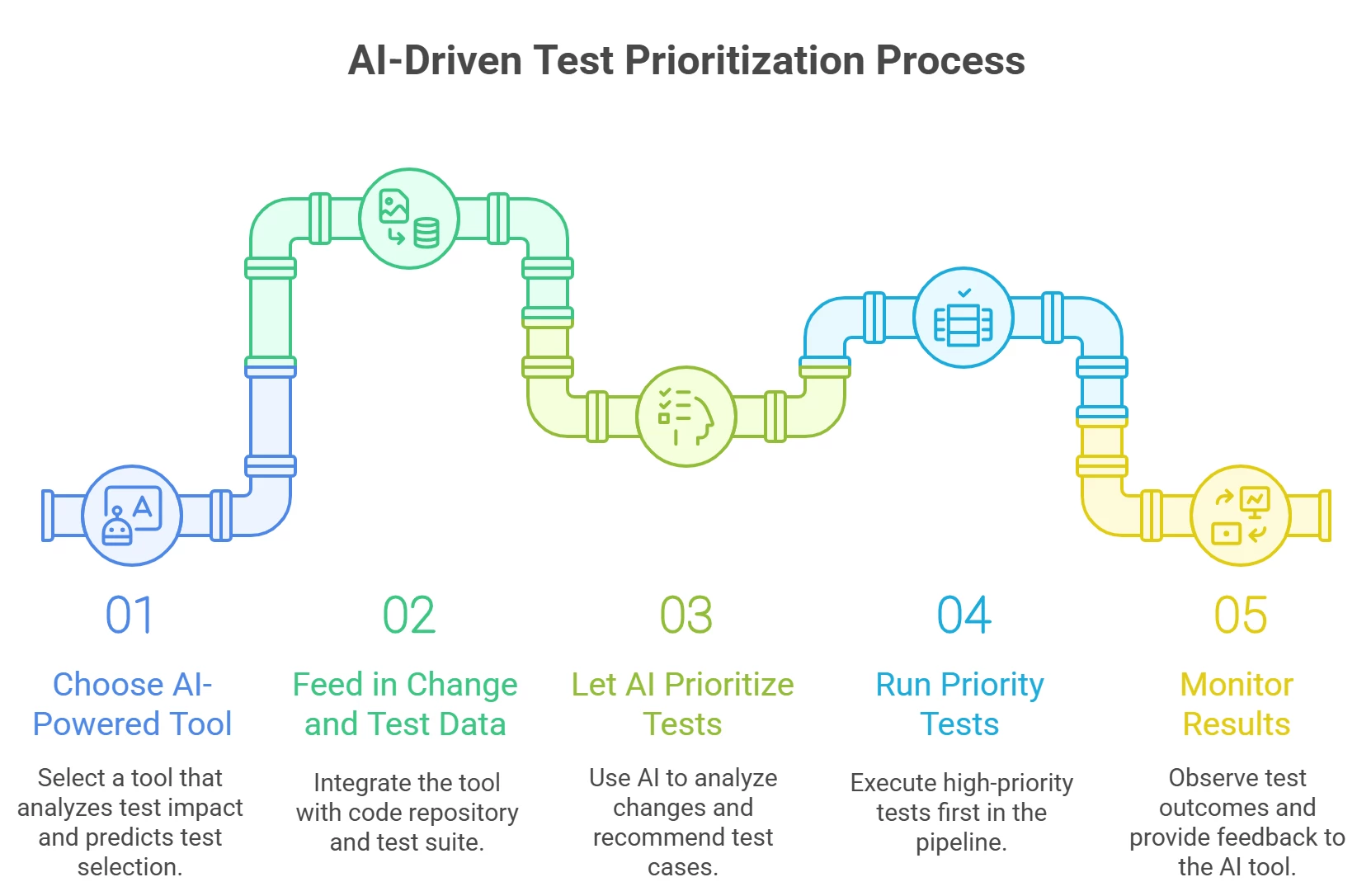
By following these steps, you’ll transform your regression testing into a smarter, risk-based practice. Testers no longer have to manually guess which tests to run after every code change – the AI does the heavy lifting, crunching code diffs and past defect patterns to spot the likely problem areas. This not only speeds up your CI/CD cycles but also lets QA engineers spend more time on exploratory testing and less on repetitive checks. The approach is practical and team-friendly: you can start small by using AI prioritization on a critical subset of tests, and gradually build trust as you see the faster feedback loops.

In summary

AI-driven test case prioritization helps QA teams work smarter, not harder. When code changes arrive, let an AI assistant figure out the riskiest parts and suggest the tests that will deliver the most bang for your buck. You’ll catch impactful bugs sooner and avoid running dozens of irrelevant tests “just in case.” Embracing this tip means leaner regression suites, quicker releases, and confidence that you’re always testing the right things at the right time. Happy testing, and see you in the next AI Tip of the Week!


2 replies

Bharat2609
Forum|alt.badge.img+3
  • Ensign
  • July 21, 2025

Meet-Tricentis LiveCompare: 2025 Update for SAP & Enterprise/ERP Testing

If you're working with SAP, LiveCompare is still one of the best tools out there for speeding up regression testing. The latest version in 2025 brings some useful upgrades:

  •  Smarter impact analysis – It now pinpoints exactly which parts of your SAP system are affected by a change (even more accurately), so you only test what matters.

  •  Faster HANA upgrade insights – Helps you clean up outdated Fiori apps and get ready for S/4HANA migrations faster.

  •  Built-in reporting dashboards – You no longer need Excel to review test impact results  it’s all visualized inside the tool.

  •  Performance and usage tracking – New dashboards give you a clear view of test coverage, risks, and system health.

Why QA teams love it: It can cut SAP test scope by up to 85%, saving time while reducing go-live risk. And it ties in neatly with tools like Jira, Tosca, Azure DevOps, and SAP Solution Manager, so everything flows smoothly.

In short, LiveCompare helps you test smarter, not harder, especially during SAP upgrades or big releases.


Thanks you !


Ramanan
Forum|alt.badge.img+6
  • Ace Pilot
  • October 2, 2025

Hello ShiftSync community!

Welcome back to our biweekly AI Tip of the Week series, where we explore practical ways to integrate AI into testing workflows. In Agile environments, code changes roll in quickly – and rerunning every test case after each change can be overkill. This week’s tip is about using AI to prioritize test cases based on risk and recent changes. In short, we’ll leverage AI-driven analysis to automatically figure out which tests are most valuable to run when code changes, so you catch critical bugs faster with less effort.

Illustration: AI-driven test prioritization focuses your regression suite on the riskiest, most impacted areas after each code update. Instead of running an entire test suite blindly, AI algorithms analyze what changed (and past failures) to select the high-impact tests that should be run first. This targeted approach saves time and finds defects sooner.

How AI Helps Prioritize Test Cases

Modern AI tools can crunch through code changes, past test results, and usage data to pinpoint which tests are likely to catch new issues. For example, AI algorithms can analyze vast historical test data and recent code modifications to predict which test cases are most likely to fail, focusing your efforts on the most critical areas. This kind of “risk AI” (or smart impact analysis) inspects the latest application changes to find the most at-risk components, guiding testers to concentrate on those areas. In practice, that means if you just updated the payment module, the AI might flag all payment-related tests as top priority – no more guessing which tests to run. By homing in on the parts of the system that changed (or carry high business risk), an AI-driven approach can dramatically narrow your regression scope while still keeping release risk low. The result? Faster feedback and confidence that you’re testing what matters most.

Crucially, AI-based test prioritization isn’t science fiction – it’s already in use. Big tech teams like Google and Microsoft have built internal machine learning systems that do this automatically, slashing their regression testing times. In fact, Google and Facebook managed to shrink their huge test suites by using ML-based test selection, cutting execution by up to ~90% while maintaining confidence in catching bugs. There are also off-the-shelf tools you can try. For example, Tricentis LiveCompare pinpoints exactly what needs testing in an SAP update by identifying which changes introduce risk. Similarly, AI-driven platforms like Launchable or Appsurify learn from your code commits and past failures to recommend a subset of tests for each new change. One such tool’s AI will determine what parts of the application were modified after each commit and automatically select just the tests relevant to those changes in your CI pipeline. Many QA management suites (e.g. Tricentis qTest, Azure DevOps, etc.) are also adding analytics to prioritize tests by risk and impact. The bottom line: AI can take the guesswork out of regression testing by telling you exactly where to focus after each code push.

Step-by-Step: Implementing AI-Driven Test Prioritization

Ready to let AI optimize your test runs? Here’s a quick plan to get started with AI-based test case prioritization in your workflow:

  1. Choose an AI-Powered Tool – Pick a solution that offers test impact analysis or predictive test selection. This could be an add-on in your test management system or a standalone service (for example, Tricentis LiveCompare for SAP, or generic tools like Launchable/Appsurify for any codebase). The key is that it uses AI/ML to correlate code changes with testing.

  2. Feed in Your Change and Test Data – Integrate the tool with your code repository and test suite. Make sure it has access to information on recent commits (which files or modules changed) and historical test results or coverage data. This context lets the AI model learn what parts of the app each test covers and how changes impact them.

  3. Let the AI Prioritize Your Tests – Now, whenever new code is pushed or a build is triggered, use the AI tool to analyze the change. It will automatically identify and recommend a subset of test cases that are most likely to uncover bugs in the modified or high-risk areas. For example, after a change in the login component, the AI might suggest running the authentication and session-related test cases first. Review the suggested test list and adjust if needed (but ideally the AI gets it right).

  4. Run Priority Tests and Monitor Results – Execute the recommended high-priority tests first in your pipeline. This way you get fast feedback on any critical breakages. If all is green, you can proceed to run additional lower-priority tests or skip them to save time (depending on your quality gates). When a failure is detected by the focused test set, you’ve caught a defect early. Make sure to feed these results back into the tool’s learning (most modern tools do this automatically) – over time, it will improve at predicting the most valuable tests.

By following these steps, you’ll transform your regression testing into a smarter, risk-based practice. Testers no longer have to manually guess which tests to run after every code change – the AI does the heavy lifting, crunching code diffs and past defect patterns to spot the likely problem areas. This not only speeds up your CI/CD cycles but also lets QA engineers spend more time on exploratory testing and less on repetitive checks. The approach is practical and team-friendly: you can start small by using AI prioritization on a critical subset of tests, and gradually build trust as you see the faster feedback loops.

In summary

AI-driven test case prioritization helps QA teams work smarter, not harder. When code changes arrive, let an AI assistant figure out the riskiest parts and suggest the tests that will deliver the most bang for your buck. You’ll catch impactful bugs sooner and avoid running dozens of irrelevant tests “just in case.” Embracing this tip means leaner regression suites, quicker releases, and confidence that you’re always testing the right things at the right time. Happy testing, and see you in the next AI Tip of the Week!

@Mustafa ,

Test prioritization by AI stands as a revolutionary proposition!🚀 In order to decide which tests are to be run after any change that enters the code, it is believed that it may intelligently accept tests that are of very high-risk and hence catch bugs much sooner. 

This is a virtual-agents assisted regression suite, customer feedback, and more time for exploratory testing. It is a smart, adaptive, and pragmatic approach that any QA team that wants to level-up should try!💡